Showing posts with label review. Show all posts

Friday, March 6, 2020

Working on Reading Comprehension with the PRIDE Reading Program {A Homeschool Review Crew Review}

Disclaimer: I received a FREE copy of this product through the HOMESCHOOL REVIEW CREW in exchange for my honest review. I was not required to write a positive review nor was I compensated in any other way.


When I first learned about the PRIDE Reading Program, I wasn't sure if it was something we were going to be able to review, seeing as all of my children can read at this point. In fact, even Harold is reading chapter books now. However, I then realized there is a Reading Comprehension level available. I decided this would be a great chance to spend some time with Hannah and make sure she is actually understanding what she is reading, as I have had some concerns. So, once I was selected for the review, I was able to order the PRIDE Reading Program Reading Comprehension Kit. 


The PRIDE Reading Program, developed by Karina Richland, M.A., is an Orton-Gillingham Method Reading Instruction Program. The anagram PRIDE stands for Phonemic Recognition Instruction Delivering Empowerment. There are actually 8 different levels that children can work through while working on reading, writing, spelling, and comprehension. Beginning Consonants, plus Levels 1-3 are the beginning levels, then there are the advanced levels: Levels 4 and 5, the Primary Accelerated Review, and the Reading Comprehension Level that we have been working in. 


There are both online and physical components of this program. We received the physical PRIDE Reading Comprehension Workbook and PRIDE Activity Kit in the mail.


Hannah started out by examining all the components, then she decided to be a bit of a silly.


Here are all the components, minus the bag/apron (yes it is a tote bag, yes my daughter is silly):


We received:

The Reading Comprehension Workbook, which is a softcover, 163-page book. Though the cover is in color, the pages themselves are all black and white. 

A 9x12 white board

Sound chart

Two dry erase markers

An eraser for the white board

A pen

A reading tracker

A die

A pouch for the smaller items

And the PRIDE carry bag which we can use for storage (or an apron, whichever). 


In order to teach the program, I also had access to the PRIDE Reading Comprehension Online Teaching Guide. This can be accessed on either a desktop computer or mobile device.

When I log in, I go to the PRIDE Reading Program and it brings up our course. I click on that to show the different modules. These correspond to the chapters in the workbook. The only difference is that the online teaching guide includes the "About the PRIDE Reading Comprehension Program" as Module 1. 

Desktop view: 


Mobile view:


Then we have the modules:
  • Sequencing
  • Predicting
  • Visualizing
  • Inferencing
  • Putting it all Together
These modules each have three units: Introduction, Practice, and Reinforcement. 

Each time I log in to the program, I just need to click on the title of the unit which is highlighted in blue. This will take us to our lesson.

The lesson scripts give me the words to say (in blue), instructions of what to do (in black), and what to write, notes, answers (in red).


Once we complete a unit, I just click on "Mark as Completed," and we move to the next unit. Our progress is recorded on the course page with the green circles with the check mark in them. 


Now, let's take a closer look at the book as I explain the different lesson steps in each unit. 

Step 1: Introducing the Concept.

The first page of each unit shows boxes with pictures in them. When we worked on sequencing, Hannah had to put "first," "then," "next," and "last" in the correct spots. 


Now that we are working on predicting, she needs to look at the picture and predict what will happen next. 


Step 2: Visual Association

This is when we utilize the Question Cards that are provided in the back of the book. These cardstock cards help guide us through the Who, What, Where, Why, and When questions that are asked in the lessons.


Step 3: Connecting the Concept

This step helps the child see how the concept connects to real life. For example, in the first picture above we talked about the people baking in the kitchen. In Step 3, we make it personal and talk about a time when we baked cookies, utilizing the question cards. This is all done orally.

Step 4: Story Organization and Step 5: Writing

While we were working on sequencing, Hannah was given a story idea to work on, and she had to work through the different steps. Then she was to write her story.


While working in the predicting module, she was given a prompt, told to come up with a prediction of what would happen, and then she was to write some reasons why. Then she was to turn that into a story.


Step 6: Reading a Story

Hannah is to read the story to herself a section at a time, then I ask her questions. After that she reads it out loud to me, so I can check how she is doing with her actual reading. Then we move on to the next section of the story, and so forth and so on, until we are done with the story. 

Step 7: Evaluation

This step is again done completely orally. Hannah was to tell me the sequence of the store and answer more questions. 

Step 8: Illustration

In this step Hannah was to illustrate the story, making sure someone who hadn't read the story could understand what was going on. 


Step 9: Summary

In this final step, Hannah was to write a summary of the story, utilizing the concept being taught, such as making sure to include first, then, next, and last in the sequencing lessons.


Each unit concludes with an Extra Learning Activity, such as a timeline of the child's life, scrambled paragraphs, and 20 questions in the sequencing units, and opposites in the predicting lessons.

I figured we would work through the program at a pace of one unit a week. We have done some units a bit slower, others a bit faster, depending upon what we have had going on in our days. So, each module will take us about three weeks. We are currently at the end of the Predicting Practice Lesson and will finish the Predicting module next week. From then we will work our way through Visualizing, Inferencing, and Putting it all Together. In looking ahead, I have noted that the units all follow the same format when it comes to the steps, which I do appreciate. 

I have enjoyed working through this with Hannah, though she isn't a huge fan of the writing, which is why we take a full week for each unit. Writing her own story and writing the summary take the longest so those lessons are worked on with nothing else on those days. I will say, we haven't been using the reading tracker, as she doesn't have a need for it, and she doesn't really need me to be reminding her with the question cards. She feels they are for younger children. 

I have appreciated being able to hear her read out loud, to make sure she is reading properly. I have discovered she does have struggles with figuring out what to write and how to organize her thoughts, so we will be working on that. Thankfully there are lots of opportunities to do so in this program. 

I think it is a great program, even though at times I wish we could choose what to write in the writing step. She found it difficult trying to figure out what an otter would do and what to talk about when it came to playing a guitar. I may just let her choose her own topic next time and see how she does.

I am very glad we had a chance to use the PRIDE Reading Program Reading Comprehension Program. It is an interesting way to work on reading and writing and organizing ones thoughts.

 You can find PRIDE Reading Program on Facebook, Twitter, Instagram, Pinterest, and YouTube

Twitter: https://twitter.com/PrideReadingCo
Instagram: https://www.instagram.com/pridereadingprogram/
Pinterest: https://www.pinterest.com/pridereading/
YouTube: https://www.youtube.com/channel/UCCfQB_M2vL2Ebo8deuwwCrw

Don't forget to click on the banner below to see what my fellow Crew Mates thought of the level they worked with.

PRIDE Reading Program Level Kit. {PRIDE Reading Program Reviews}

Wednesday, September 18, 2019

Having Fun Learning Multiplication Facts with Online Times Alive {A Homeschool Review Crew Review}


Are you looking for a fun way for your children to learn their multiplication facts? Honestly, at one point, I didn't think my children needed anything beyond sitting down and memorizing the times tables. I mean, it's what I did as a child, and it worked for me. However, a couple of years ago I was introduced to Online Times Alive from City Creek Press, Inc. through the Homeschool Review Crew. At that point the older girls used the program and Hannah sort of looked on every now and then. When we had this chance to review it again, I was eager to have an opportunity to use it with Hannah. 


This time around we were given a six-month subscription to Online Times Alive. With this fun, animated program, children get to watch video stories, listen to the related songs, play games, and complete progress checks to help them remember the different multiplication facts from 0-9. 


Yes, you need a computer with internet access to utilize this program. They also have an app available for iOS 9.0 or above: however, this wasn't something we could utilize. Besides, I sort of like having the children working at the computer instead of on an app. 

You can have multiple children on one computer or you can have children use different computers, but each child needs to make sure they are using the computer they used previously as progress is saved to the hard drive of that computer. Each child will have their own login name, though no password is needed. They just need to make sure they type in the name correctly, including making sure they know whether they used upper or lower case seeing as it is case sensitive. 

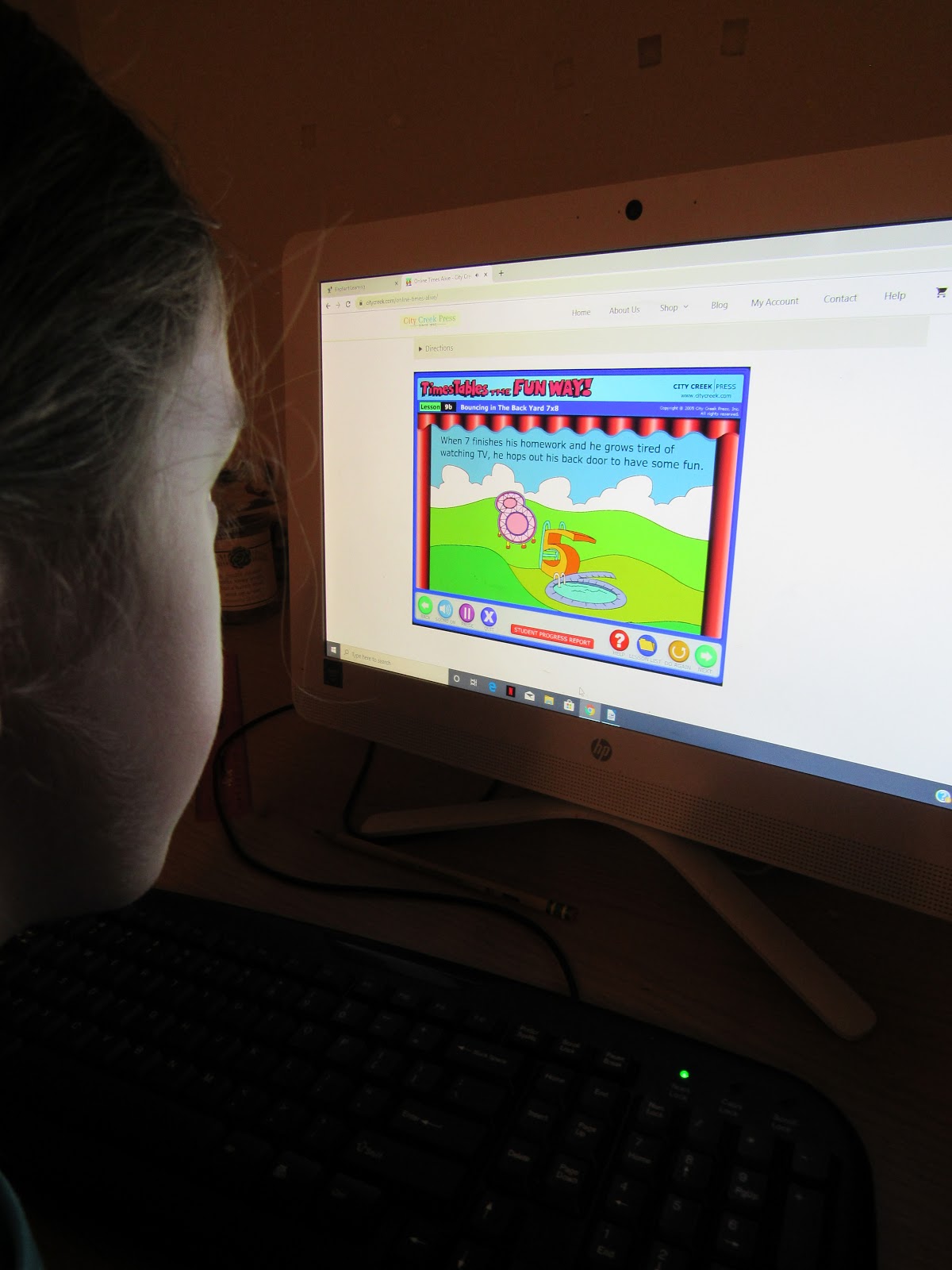
Once we gained access to the program, which was quite simple, the girls were able to get started. Yes, I said girls. I had Hannah working through the program, and I also had Amelia using is as review. It appears that most of the facts had "stuck" from the last time through the program, but there were still some that she was finding difficult to recall. I had wondered if it was because she had zinged through the program two years ago, completing multiple lessons in a day, instead of following the recommendation of working on a lesson at a time. One thing I had noticed is that the child isn't told that they are at the end of a lesson, it just continues from one lesson into the next. So, a young child, especially if they are enjoying themselves because it is such a fun program, may just keep going. That is one thing I remember wishing, and still do wish, was different with the program. It would be awesome if there was a reminder that would pop up, stating "This is the end of Lesson ___, please take a break and continue later." Or something like that. Because this program is great for a child to work on independently, a parent isn't hovering over them while they work, so I had no clue when they were supposed to be done for the day. 

Anyway, I got off track a little there. As I was saying, it is quite simple to get started on the program. First the children are warned that only kids who want to have fun can use the program. Which I think is cool, especially because it is stated in a sort of robotic voice.


Then they come to the login screen.


Once they enter the program they find the Lesson List. 


Let's talk about this screen for a bit.

Lessons 1-11 are on the first screen, and lessons 12-18 can be found by clicking the red arrow toward the bottom right-hand corner of the screen. The blue box above the arrow is a key explaining the different icons you will find on the lesson list. Each lesson will begin with either a progress check (which happens after every four lessons) or the animated movie for the new fact. There is also a pre-test and a post-test, and quizzes (in the form of games) throughout the program. The circles to the left of each lesson depict the child's progress. An empty circle means the lesson hasn't been done, a circle that is partially filled in yellow means the child has viewed the lesson, and a completely filled in circle containing the number 4 means the child has completed that section of the lesson. They can always go back in and view sections which they have previously completed. 

Also in the lesson chart you will see the lesson number, title of the lesson section, and the facts that will be focused on in the lesson. 

You, or the child, can click on the red "Student Progress Report" to see when each lesson section was completed. If the section has been completed more than once, you will only see the most recent date. You will also find the results for the tests/progress checks. You can see how many the child got correct, the percentage grade, plus the length of time it took to complete. 


Also found on the Lesson List screen is a purple "Teacher's Directions" button, which I never really explored last time around, because the program is quite simple to understand. However, just to let you know, if you click this purple button, you will find directions for the program, including objectives, how to use the program, how to use the progress report, and how to clear a test.


Now, let's take a look at the actual program. 

Before getting into the lessons, the child is to take a pretest. This is scored and timed, so progress in accuracy and speed can be assessed as the child moves through the program. I explained the the children, that they should check and make sure the answer they want is the one that is showing on the screen. They are able to change their answer prior to clicking the "Done" button.

Here's a look at the pretest I took, with a couple of mistakes, because I was checking to see what a student had to do to fix their answer before clicking done. 


I asked Hannah what one of her favorite lessons was, and she told me 8x8=64,which is lesson 5.

The narrator will tell the story as the words appear on the screen. 

 At the conclusion of the story, there is a reminder of how the pictures relate to the story which relate to the multiplication fact. I sort of like this one too, because they make the word "sticks" represent 6 and the "for" represent 4. And because the sentence has to go "The sticks are for the fire," the child should remember that the answer is 64. Hannah realized that she got the answer wrong during a progress check because she had typed in 46 instead of 64. She was like, "Oh wait, the sticks are for the fire, which means the six comes first, so it is 64."

In fact, I had her tell me the story, and I loved that she was able to tell it in her own words. This is what she told me, "There were two eights they were the snowmen, so eight times eight. And they were super cold and they were going for a walk. Then they found a sign that said 'the sticks (in other words six) are for (as in four) the fire.' But once they got towards the fire, they shrunk. The end."

After the story ends, the child will watch a "music video." This uses the same animation, but has a catchy tune with different words. The connection between the story and the math fact are again reinforced. 


This brings the child to the little quiz, which might be a guessing game or sliding pictures game. In this case, it was a guessing game. The children are asked to remember the characters in the story and remember what happened. They then need to type in the fact.


After answering correctly, the child moves to the next screen where they need to solve the problem without the picture. If they are right, they are rewarded with an exuberant "Excellent!" 

I asked Hannah what one of her other favorite stories was, and she said 6x4=24. Again, I asked her to tell me the story. Here it is in her own words. 

"Once there was a snail who was tired of just looking at the ground. He wanted to be able to fly. He wanted to be a swan. He heard of a magic lake that could make one of your wishes come true. So he found the lake and got in. And he closed his eyes and wished with all his might, and POOF, he became a swan. The swan formed a two and the lake was a four. And the snail actually was a six. And the four is still a lake."

Hannah and Amelia have been making their way slowly through Online Times Alive. I wanted to make sure they did NOT zing through like Amelia did last time, because I want to make sure these facts stick. 


They get on during their computer time, watching and listening to the story and song, and answering the quiz question. Then, I have them move on to another subject. I love seeing how their recall is improving, and I especially love having Hannah tell me the stories, and seeing how she connects it to the multiplication fact. Amelia says she is still struggling with some, but we will continue working on it.


I absolutely love the play on words (i.e. thirsty sixes for 36, or sticks (6) are for (4) the fire), the catchy tunes, the fun animation, and the pictures shaped like the numbers. I also appreciate that they teach tricks for such numbers as 5's and 9's.These things stick in the children's brains to help them remember the facts and improve recall, which is very important as they get older. I love listening in the other room and realize Hannah is signing one of the songs. 

I definitely recommend you try Online Times Alive, especially if your child is struggling. 

You will find City Creek Press on Facebook, YouTube, and Instagram.

Don't forget to click on the banner below to see what my fellow Crew Mates thought of this fun, online multiplication program.

Online Times Alive {City Creek Press, Inc. Reviews}
Crew Disclaimer

Friday, September 13, 2019

Working on Grammar with Easy Grammar Systems {A Homeschool Review Crew Review}


Grammar. The subject I would prefer to avoid. The subject my daughter doesn't see the use of. And the problem is, mom doesn't know how to explain the necessity either, seeing as I get along just fine without understanding all the ins and outs of grammar. However, now that I am the teacher and not just the mom, I need to be able to teach grammar to my children. So, when we are offered the chance to review a grammar curriculum, I jump at the opportunity. I figure we can learn together. Even though Tabitha was less than thrilled with me, I welcomed the opportunity to review Easy Grammar Plus from Easy Grammar Systems. 


We received an email with the link to the Easy Grammar Plus eBook PDF. It was quite simple to click on the link and download the file to my computer. And from there, we were ready to go.


This 720-page  book is actually the Teacher Edition, which includes teaching instructions, reviews and tests (both unit and cumulative), plus answer keys. As we had the downloadable files, I was able to easily print out the exercise pages and give them to the children to work on, without having to worry that they would have access to the answers. I say "worry," because the answer pages are on the left side and the exercises are on the facing page in the physical book. If we had received the book, which I had originally thought I wanted, I would have had to use  photocopied the pages for multiple reasons. One, I ended up using the book with both Tabitha and Amelia. Two, I probably would have photocopied them anyway so I could use it in future years with the younger children. And three, I would have wanted to make sure the children didn't see the answers. So, even though it wasn't my original choice, I have to say I am glad we received the book as a downloadable eBook. 

I will add, if you don't want to photocopy or print, and also don't want your child to write in the teacher edition, there is a physical Easy Grammar Plus Student Workbook available. There is also an Easy Grammar Plus Student Test Booklet, seeing as tests are not included in the Student Workbook.

Let's look at what is contained in Easy Grammar Plus: 

The book begins with the Table of Contents. There is then an eight-page pre/post assessment test and an introduction before getting into the lesson pages. The book concludes with the answers to the pre/post assessment test. 

Here is a list of the topics covered in Easy Grammar Plus:
  • Prepositions
  • Verbs
  • Nouns
  • Interjections
  • Conjunctions 
  • Adjectives
  • Types of Sentences
  • Sentences, Fragments, and Run-ons
  • Phrases and Clauses
  • Adverbs
  • Pronouns 
  • Punctuation
  • Capitalization
  • Letters
The Introduction explains the purpose of Easy Grammar Plus, which is to provide grammar TOOLS to the student. The author also explains the two most important guidelines for using the book. The parent/teacher is to insist on MASTERY learning (making sure the student fully understands the concept) and ensure that the student first memorizes and learns the list of fifty prepositions.

Unfortunately, this first directive completely turned Tabitha off of this book. In the past she had been told that it wasn't important to memorize lists such as this. Additionally, she is not good at memorizing lists. When it comes to passages, such as Bible verses for church or Bible Quizzing, she can memorize with no problem. Of course, because of the overwhelming amount of memorizing she is currently doing because of Quizzing, she didn't want to have to memorize more. So, yes, she balked. She said she couldn't do it. Amelia, who I wasn't originally going to include in this review because she is in sixth grade, actually tried harder than Tabitha did. I honestly didn't like that this had become such a point of contention in our day. I mean, as I mentioned above, Tabitha already complained that she didn't see the need of learning grammar. I even tried telling her, just read through the list a few times a day, don't worry about sitting down and memorizing it, just familiarize yourself with the prepositions. 

I finally decided we couldn't spend so much time focusing on the memorization of a list of words, so we moved forward in the book. I figured they could have the list of prepositions in front of them while working, if needed. My sneaky desire was that they would still learn them as they used the list, viewing it several times a week. 

I think the girls did have fun playing the Bingo game that was designed to help them familiarize themselves with the prepositions.


Though they weren't as fond of having to unscramble them.


Now, let me just say, I do understand the idea behind memorizing the prepositions. However, I believe children can learn them, get them in their heads, by diving right into the lessons and having the list in front of them to reference. I understand that this book uses a "prepositional approach," where the student works in a sequential manner, starting with the basics of the sentence, identifying the subject and verb by crossing out the prepositional phrase, and then working on more challenging topics. I understand this. I just question the need to memorize the list and make it a mandatory first task.

I like how the girls began by looking at simpler sentences, just needing to identify the subject and the verb, but then the sentences became more complex as they were to also identify such things as compound subjects, helping verbs, and infinitives. Of course, then they were taught that a word listed as a preposition wasn't always used as a preposition. It might be used as say, an adverb. Which got an "I told you so" from Tabitha, because that was one of her arguments when she fought memorizing the list. I did explain that that doesn't negate the fact that the words are still used as prepositions.

Here's a look at how the lesson is laid out. First there is a short instructional page with examples:


Then comes the answer page: 


And finally, the actual exercise page where the child is to follow the instructions on what to cross out and single or double underline:


So, you can see where having the prepositions memorized would help with this curriculum. In order to quickly identify the prepositional phrases, a student is going to have to know their prepositions. Of course, I assume you can see, as I did, how a child can still work through the exercises by having the list in front of them. So yes, our little modification for this book. As I looked ahead in the book, I did notice that prepositions don't always come into play in the exercises for the other topics. However, there are times when students are still asked to work through the sentences as they are taught in this first section, before working on such things as labeling types of verbs or adverbs.

How did we use this book?

After our time of trying to memorize the prepositions and playing the Bingo game, the girls have been working their way through the book at the rate of a few lessons a week. I will read the short lesson information, and then I have them give me the answers orally to the examples. Then I hand them their page and have them work through the exercises. This takes them, at most, 15 minutes a day.


The Preposition section concludes with a review and test. The Verbs, Nouns, Adjectives, Adverbs, and Pronouns sections also end the same way. The Punctuation and Capitalization sections go straight into a test. And when a child finishes the entire book, they are supposed to retake the assessment test to see how they have improved. 

All in all, I think Easy Grammar Plus from Easy Grammar Systems is a great grammar curriculum that helps a child really look at a sentence and understand the different parts. 

You can find Easy Grammar Systems on Facebook, Twitter, and Instagram.

Don't forget to click the banner below to see what my fellow Crew Mates thought of this, plus other products, from Easy Grammar Systems.

Easy Grammar, Daily GRAMS & Easy Grammar Ultimate {Easy Grammar Systems Reviews}

Crew Disclaimer
Related Posts with Thumbnails