Thursday, October 24, 2019

Working on Math with Smartick { A Homeschool Review Crew Review}


I thought it would be fun to allow Amelia to take a break from her normal math, so I asked for the opportunity to review the online math program called Smartick thanks to the Homeschool Review Crew.


We received 6 months of access to this math enrichment program. In this program, designed for children ages 4-14, a student works on math. However, that isn't all. The program also incorporates reading comprehension, logic, and reasoning to help improve problem solving and critical thinking skills. Smartick adapts to the child's learning needs thanks to artificial intelligence. Each day the child's lessons will be based on what the program determines the child needs to work on. Smartick covers the following topics:

  • Counting
  • Numbers and Operations in Tens
  • Operations and Algebraic Thinking
  • Fractions
  • Decimals
  • Measurement and Data
  • Geometry
  • Integers
  • Expressions and Equations
  • Logic.  
When Amelia first started with Smartick, she was given an assessment which the program used to adapt her daily sessions. Since then she has been working approximately 15 minutes a day, several times a week during her computer time. Yes, you read that correctly, she only has to work on math for approximately 15 minutes a day.

This screenshot shows the progress she has made so far in each area.

As you can see, the program has had her working primarily in five sections: Counting, Numbers and Operations in Tens, Operations and Algebraic Thinking, Measurement and Data, and Geometry. She's also done a little bit with Integers and Logic. 

Here are some of the types of problems she has worked through. This is a sample of the 70 problems she worked on during her session on October 23rd.

There was multiplication and division.


Then she needed to work with a number line.


And some more multiplication and division.


Plus working with patterns.


Some days the work is harder than others and she struggles more.

These problems represent a couple of the kinds of problems she has had difficulty with.


The thing is, I think she could actually figure these out, but she is rushing to get done before the timer runs out. Honestly, that is one of her biggest complaints about this program, which has caused a lot strife when it comes to having her work on her math. She feels way too rushed and can't concentrate. Though she isn't a fan of Smartick, I can see the benefits.

As a parent, I get daily email results, immediately after Amelia finishes her session. Not only does this tell me that she actually got her math done, but it tells me what she worked on and how she did. The email gives me a brief overview of the day's session. She's had days when her results were quite poor, her speed was slow and her score was low. But then she has days when she receives an Outstanding.

Here are her results from yesterday.


I appreciate that I can see more detail on the Parent Page of the site. 

The calendar shows the days Amelia did her math session. The different colors represent how she did. Red is Improvable, yellow is Satisfactory, and green is Outstanding. There is also one day (October 1st) where it is gray. On this day she actually gave up and didn't finish the session because she got frustrated. Then there is the diploma which represents a Revision Session and the light bulb which represents a Logic session. The only other icon that is different is the paper and pencil image that represents a Level Assessment, which she had back when she first started in September. 


I can click on any of the circles to see more details.

In the screenshot below I clicked on the October 23rd circle. This tells me she did Outstanding, her performance or grade is 92% and she worked at standard speed. I can then click on the orange "Review session" button to see more details.


Now I can see how long it took her to do the assigned problems for the day. Though she only has to work for 15 minutes a day, it took her 22 minutes to complete the work. So, I'm assuming if it takes her 15 minutes or less to finish the work, that will be counted as Extraordinary speed. I like that the grade is then broken down so I can see what her performance was in each category and how many exercises she had in each of them.


I can then scroll further down the page to see the results for each problem.

As she works through the sessions she earns "ticks" which can then be used in the virtual world.


As a child progresses, other rewards such as diplomas are received.


Clicking on the diploma image in the results box will allow the child to see what the next diploma they are working toward will be.


Of course, children these days tend to enjoy the motivation of being able to play with their avatars in the virtual world. Here the student can do such things as make friends, shop, and even play games.

The ticks that can be spent in the virtual world plus the diplomas that can be earned are wonderful ways to motivate a child. I can definitely see where Amelia has improved with her recall of basic multiplication and division facts since using the program. However, in addition to not liking the "being timed" factor, Amelia does not like that she isn't taught lessons. She gets so frustrated and it is quite a fight to get her to do her math. When I asked her why she didn't like the program she said, "I don't like it because it doesn't tell you how to do the stuff, and then it gives you a short time limit to figure out the answers to the questions. But it doesn't ever teach you. And several of the questions are confusing and I have no idea what they mean."

I also realized I'm not fond of the fact that I don't know what grade level she is working at. Some of the problems seem way to simple, such as this word problem.


At first I was thrilled because I thought she was doing so well with word problems. Then, I realized the problems seem way too simple for a 6th grader.

So, is this a program we are going to continue using? I'm honestly not sure. I know Amelia doesn't like that it doesn't actually teach the lessons. Of course, this is because this is more of a supplemental program. But, if she has to work with another program as her main math program, I am not sure if she will want to get on Smartick for extra math work. I can definitely understand her frustration when she doesn't understand what she is supposed to do or how she is supposed to do it, especially when she has to beat the timer or she is marked wrong. However, having the motivation of taking care of her hamster in the virtual world has made her consider possibly continuing working with Smartick.

Sadly, I am unable to give this math enrichment program a glowing review. There are definitely some good aspects of the program, but I feel like she is not getting the math education she needs at this point. 

You can find Smartick on Facebook, Twitter, Instagram, and YouTube.

Don't forget to click on the banner below to see what my fellow Crew Mates had to say about Smartick.


Math Enrichment Program {Smartick Reviews}

Crew Disclaimer

Wednesday, October 23, 2019

Wordless Wednesday: October 23, 2019 (w/linky) - Even More Swiftpaw

Yep, more pictures of our porch cat Swiftpaw. He's been ending up inside more and more.


Looking forward to seeing your Wordless (or not so wordless) Wednesday posts this week.

No button currently, and there won't be one until I can figure it out seeing as Photobucket has changed things. Feel free to still share the picture in place of the button on your Wordless Wednesday post or in a list of Wordless Wednesday linkies. Just link it to my Wordless Wednesday permalink please.


You are invited to the Inlinkz link party!
Click here to enter

Creating Works of Art with Creating a Masterpiece {A Homeschool Review Crew Review}


Tabitha is quite the artist, and I thought she would appreciate the chance to try out an actual art program this year. When I learned that Creating a Masterpiece was coming up for review, I was hesitant at first. I had wanted to try this program out in the past, but we couldn't afford the art materials that were required. I understand that quality supplies are essential, but, they weren't something we could justify purchasing. So, I have to say, I was thrilled when I learned we were going to be reviewing the Drawing Program, because it doesn't have near as many required supplies. And thankfully, Tabitha already had a set of quality colored pencils, so we didn't have to purchase too many supplies to use this program. 


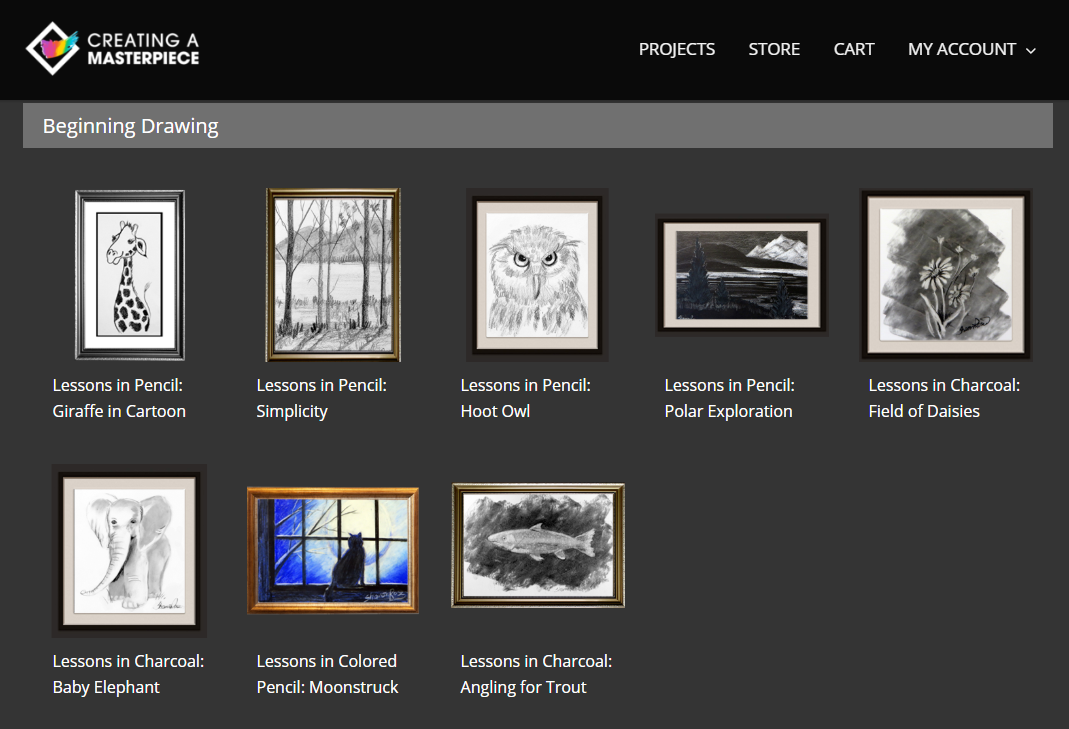
We received a one-year subscription to the online Drawing Program which includes four levels: Beginning Drawing plus Levels 1-3. The Beginning Drawing level that we were working in has eight different projects. The number of projects in the other levels ranges from 6-8. There are a total of 30 projects and 48 lessons.

Here are the lessons from the Beginning Drawing level:


When I was first perusing the site and trying to figure out which supplies we would need to purchase, I tried to focus on the simplest projects so we wouldn't have to spend too much money right away. I figured if Tabitha was really enjoying the program, we could purchase additional materials at a later date. So, I was gravitating to what I assumed would be the simplest lessons, such as the Giraffe in Cartoon and the Hoot Owl. Tabitha was very interested in doing the Field of Daisies though, so I decided we could also purchase some charcoal. I think what threw me the most was that there were so many different types of paper that needed to be purchased. I learned that there are reasons for the different types of quality paper. 

So, we purchased the needed materials. I love that the instructor, Sharon Hofer, includes not just a supply list, but a link to the supplies at the site she recommends purchasing from. Granted, you aren't required to purchase from them, but it sure made things simpler.

Here's what we ended up buying.


And then we were ready to get started.

To go to a lesson, we just needed to click on the image of the project or the title from the "Beginning Drawing Level" page pictured above. From there we are directed to the informational page for the project. 


Clicking on supply list will show you what you need, along with a nifty chart that shows how the needs change with multiple children.


Once you have all your supplies lined up, you can click on the lesson link at the bottom of the informational page. Here you will find the following:
  • Lesson Videos
  • Project Supplies and Downloads
  • Supplies Used in this Lesson
  • Helpful Tips
  • Project Images
  • Lesson Highlights
  • Student Showcase

Let's take a look at the Lesson Videos, the main part we focused on. 

The number of sections varies with the different lessons. For example, the Giraffe in Cartoon only has four sections, but Moonstruck (the project Tabitha started with) has six. 


The first video is an introduction to the project and then the remainder are step-by-step lessons with Sharon Hofer teaching. We either see her talking to us, or see her working on her project from above, sort of like we are looking over her shoulder.

She starts out the lesson by introducing herself and the inspiration for the project. Then she lets you know what supplies to use, explaining specific details, like why she uses a specific paper or why she uses a specific size. For example, for the drawing she recommends using a smaller sheet as it is easier.


Here she was sharing a picture of their kitty, the inspiration for the Moonstruck picture.


She then takes us through the project, step-by-step, helping the viewer to make note of details, such as the shapes that are being used.

Here she has worked on drawing the window and moon.


Then she moved on to the cat. Here we had to pay attention to the egg-shaped body, the circular head and the rectangular leg. 


Here's Tabitha working on hers.


Through each 5-10 minute video, the student follows along, sometimes pausing the video to be able to catch up. With Moonstruck, branches were added, then we start coloring in the different sections, creating darker and lighter areas by shading. She also had us using an eraser to make sections almost white again.

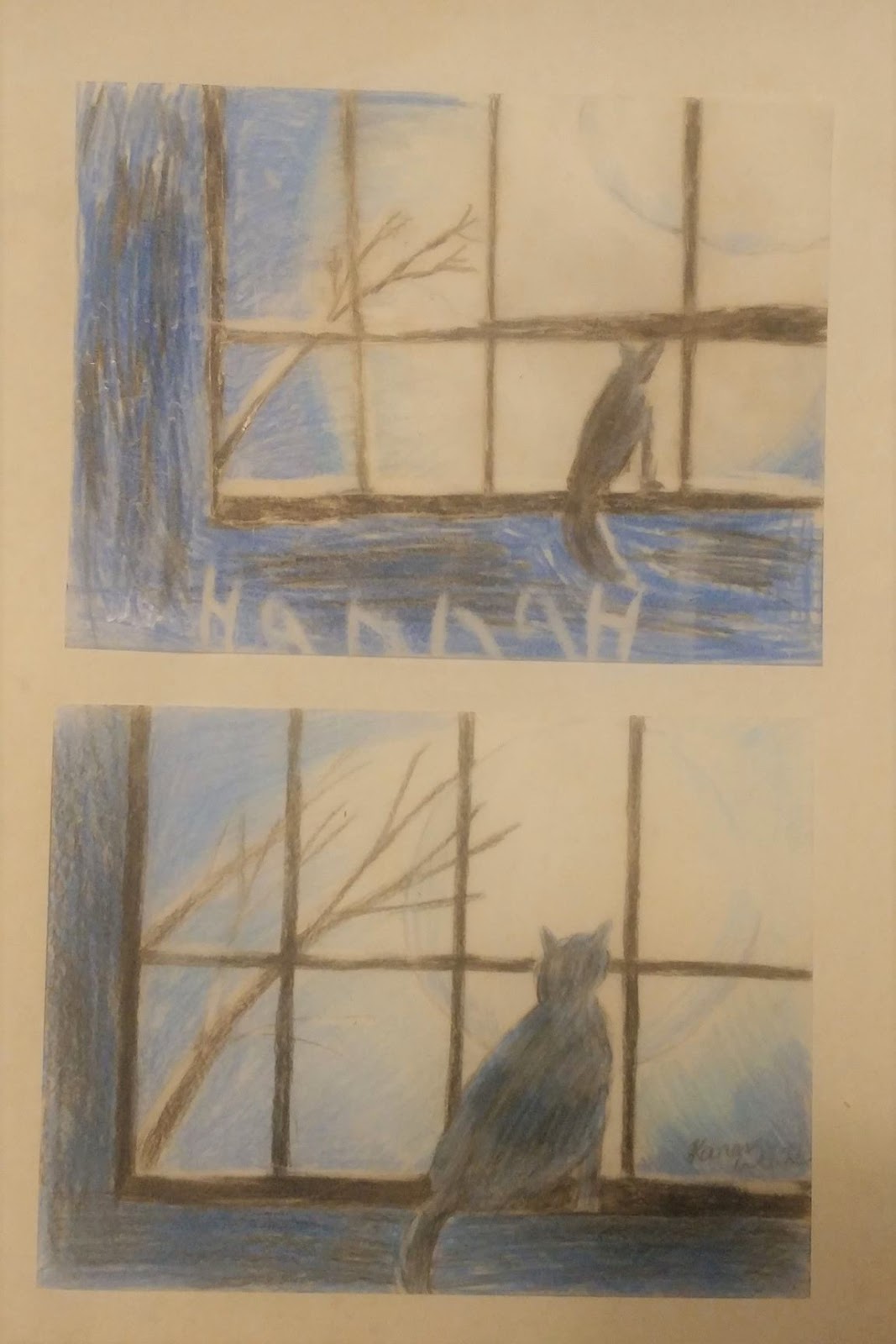
Yes, I said we. Though Tabitha was the first one to work on this project, Hannah and I worked on it during our mommy-time. Here are our results. 

Tabitha chose to draw her picture twice. Once on the recommended paper and another time in her sketchbook. She actually prefers the way it turned out in her sketchbook (the bottom drawing).


Hannah and I enjoyed working together.


I also spent some mommy-time working with Harold on a drawing. He wanted to make the Giraffe in Cartoon. 


Miss Sharon showed us the real-life picture of the giraffe that inspired this project.


She explained how we were going to be exaggerating features to make the giraffe more cartoony.

Harold might have gotten a little carried away with the length of the neck.


He was quite pleased with his drawing.


I think both of ours came out very nicely actually.


The thing is, this was actually our second attempt. Harold wasn't that happy with his first drawing, so I agreed to do it again.

I can't tell which one of mine I like best.


But I do know that it was a lot of fun to do, and it was a great way to get some one-on-one time.

I also love that Harold was inspired to try his hand at making a dog picture he found into a cartoon.

So, as you can see, even though I asked to review this program with Tabitha in mind, she wasn't the only one using it. In fact, I even got Amelia to try it out. Tabitha and Amelia decided to work on Simplicity. I think they both came out very nicely.


I love how each person is able to have their own style come through, even while following a step-by-step lesson. 

Of course, I did mention that Tabitha had wanted to do the Field of Daisies, which is why I purchased charcoal. And yes, yes she did. In fact, she drew two masterpieces, again using two types of paper. 


The one problem we had with this project is that the charcoal kept rubbing off because we didn't have anything to seal it with. Though she mentions using a sealant in the video, it wasn't listed on the supply list, or we would have gotten some before starting. I think that is one thing I wish she would change. It would be awesome if everything needed was actually on the list. I realize it isn't a huge issue, and really that is the only time we've noticed this so far. 

The other thing some of the children and I had an issue with was when she would draw a section, and then decide she wanted to move it over a bit or change the shape. I understand that she is showing the flexibility of drawing, and how easy it was to erase, especially when we were working on the vellum paper. However, I am not one who likes to do a lot of erasing even then. So, I did keep my picture the way I originally drew it, and was quite happy with it.

We are enjoying these art lessons very much and are very thankful we were able to review the Drawing Program from Creating a Masterpiece. Miss Sharon is very easy to follow, and she explains what she is doing at each step in a very understandable manner. So, even though I originally thought it was Tabitha who was going to be using the program, I was pleased to see that even the younger children were able to join in. In our family, the art students ranged in age from 7 to 40-something. So, I would have to say, this is appropriate for a wide range of people. Even Amelia, who always complains that she can't draw, did a wonderful job on simplicity.

 I'm so glad we have a year to work our way through all four levels of the program. I'm sure our art skills are all going to improve.

You can find Creating a Masterpiece on Facebook.

Don't forget to click on the banner below to see what my fellow Crew Mates thought of this art program.


Learning to Draw {Creating a Masterpiece Reviews}
Crew Disclaimer
Related Posts with Thumbnails