Friday, June 3, 2016

Getting Organized with the Hey Mama! Print Schoolhouse Planner {A TOS Review}


I admit, as much as I have tried to change, I am just not an organized person. Last year I had every intention of working on that, but alas, I remain unorganized. This is really concerning at this point in my life, because I have been having an awful time keeping track of all things related to school. The reason it is so imperative that I change this flaw is because this is the first year that I am supposed to be reporting to the school district. Here we are at the end of the school year and I am scurrying around to get myself organized to send a portfolio to my evaluator. As you can imagine, this can cause a bit of a lot of stress. So, I know I have to change my tactics for the next school year (and beyond). When we were offered the chance to review the Hey Mama! Print Schoolhouse Planner 2016-2017 from The Old Schoolhouse, I knew it was something I would like to use. 


I have tried other physical and online planning tools in the past, and they just couldn't help me; however, the design of the Hey Mama! Schoolhouse Planner was one that actually worked well for me when I had one a few years ago.  I was glad to see that the format is the still the same.

Here, let's take a look at the features of this planner. 
  • 196 pages
  • Spiral Binding
  • Yearly calendars for 2016, 2017, and 2018
  • Monthly calendars with notes.
  • Hey Mama! letters
  • Weekly Planning pages
  • Goals Pages (monthly, semester, and yearly)
  • Attendance Charts (enough for 5 children)
  • Books Read This Year
  • Curriculum Planning Sheet
  • Homeschooling Contact List
  • General Writing Prompts
  • Story Starters
  • The Thirteen Colonies by Date
  • Timeline of Inventions
  • U.S. Presidents and their wives
  • Branches of government
  • United States and Capitals 
  • Academic Transcript information
  • Checklist and Skills Learned
  • Other Courses
As you can see, there is quite a lot offered to help the homeschool mom.


The planner begins with 3 yearly calendars for a quick at-a-glance look at the years ahead. 


Then it moves into the monthly calendar section, which starts with July 2016 and ends with June 2017. Each month begins with a "Hey Mama" encouraging note. 


On the opposite page there is room for notes. I have yet to decide how I am going to use these pages. 


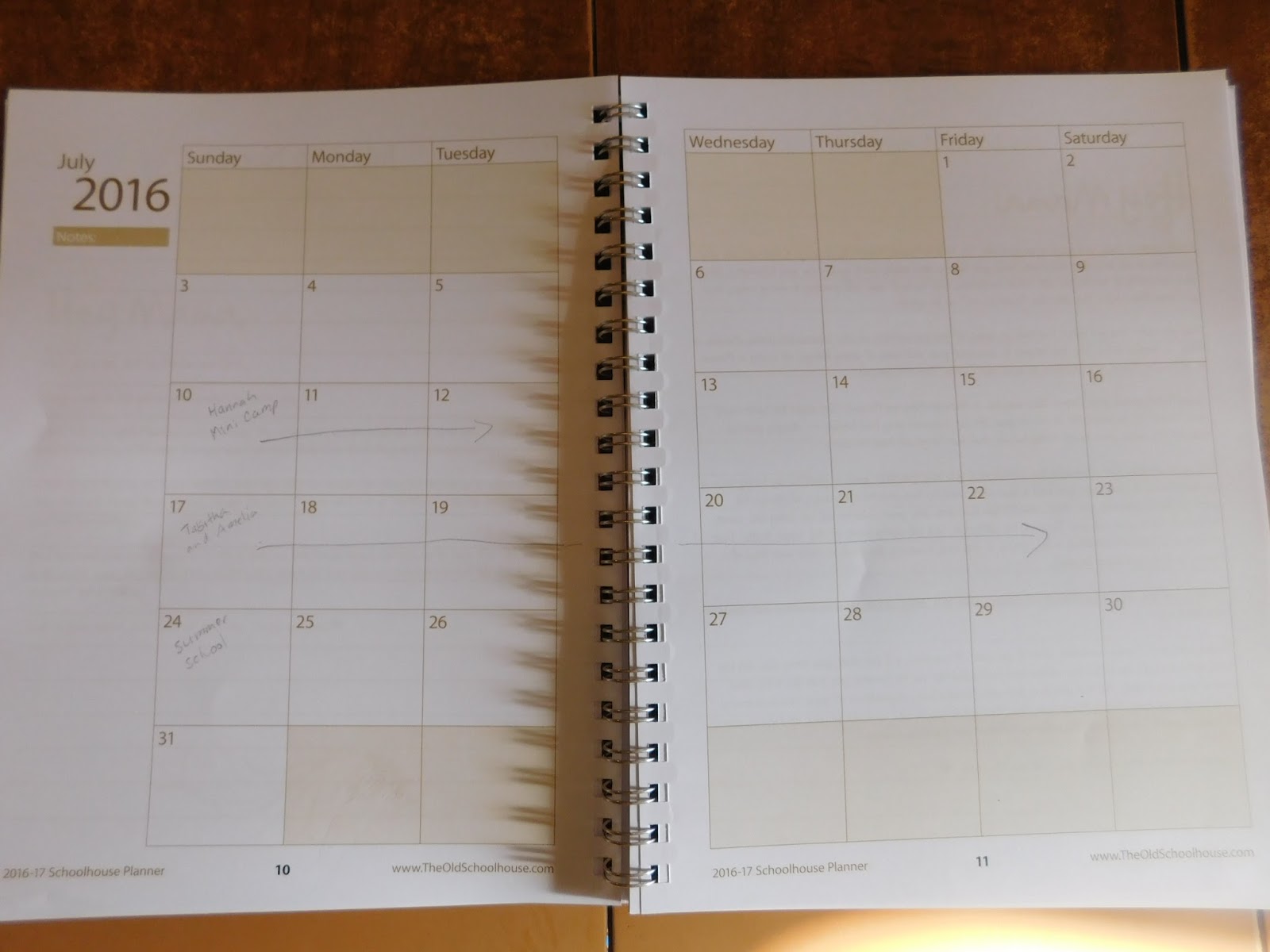
The monthly calendars are double page spreads which show the month with boxes big enough to write important information. For the summer months I have been able to add in when camp is going to be, plus our summer school and VBS dates. I am also using these calendars to write down review due dates and doctor appointments. I am currently figuring out our summer schedule so I can get ready to plan for next year. 

After the monthly calendars there are the 36 Weekly Planning pages, also double page spreads. There are different suggestions for how to use these pages on the website, such as writing the dates across the top, or writing your children's names across the top. I will probably be using these the same way as a did a few years ago. I will write the dates across the top and then label the sides with the subjects we are learning. Though I have 4 children, the older girls are combined in one level and the younger two are combined in a different level, plus the younger ones join in with the older girls for a lot of our learning. And because we are eclectic review homeschoolers the books or programs we use for a subject may change and I will write down what we are supposed to be working on with our review products. 


For me, the Weekly Planning Pages and the Monthly Calendars are the most important for getting and keeping me organized. I will be able to have a record of what we have to do, plus it will show me what we have done at the end of the year.

As you are going through your year and turn the pages of the planner, you will see that there are more encouraging Hey Mama! notes spaced throughout.

After the weekly planning pages you will find the pages to write down goals for your children. And if, like us you don't have 5 children, you can even choose to use the extra goal sheets for yourself. This will be something I would want to sit down with each child individually to delve into, with daddy present. We will work on these closer to the beginning of school.


Next you will find Attendance Charts. We do have to have 180 days of schooling here in Pennsylvania,so these will come in quite handy. And yes, there are 5 of these as well.


Here in Pennsylvania we need to keep a log of books that are read, so I was so glad to see the "Books Read this Year" forms are still included in the planner. I was a bit confused as to why there are only 4 when the other forms for the children have enough for 5 children. For now, it isn't a big deal as I am only going to be using them for the older girls as they are the two who I have to report to the school district for anyway.


Next there are Curriculum Planning Sheets (yes 1 for each of 5 students). 


This Homeschooling Contact List will be great for jotting down information for friends at co-op.


The next several pages are chock full of helpful tidbits for homeschooling. I am looking forward to using the writing prompts and story starters with the older girls. I may even be able to use some with the younger children. The page about the colonies not only includes the year they became colonies and the year they gained statehood, but what the origin of the first settlers where plus the main religion (you won't find that information in any secular book these days). Additionally, important people are also included. Glancing through the timeline of inventions chart, I know the children will have fun learning this information, especially because some of the inventions are things we have been learning about in our American history lessons. We can focus a bit on government with the President chart, branches of governments chart, and the states and their capitals chart.

For families with older children, you may find the information for creating an academic transcript helpful, along with the actual page for a transcript. I admit, I am a bit unsure how the last two forms are to be used. Though I did find it weird that the form seems to be for one month's worth of skills, yet there is only one form which wouldn't be enough for the school year. 

Now, you may have noticed that there are only 36 weekly planning pages. So, if you school year round you will want to keep that in mind. If this is a problem, they do offer a digital version of the planner. 

I am looking forward to reading all of the encouraging Hey Mama! notes that are sprinkled throughout the planner, as I come to them during the year. I have decided I would like them to be fresh surprises instead of looking at them all now. 

All in all, I am looking forward to really getting in to planning for summer school and the next school year. I am hoping that by this time next year I will be less stressed and more organized thanks to the Hey Mama! Print Schoolhouse Planner. I'll have to keep you updated.

Normally, you can purchase the planner for $29 here in the U.S. In Canada the price is $48.95 and Internationally it is $53.95.  However, here is some really, really good news! As a member of the Crew I have been asked to share this wonderful coupon code with you. You can get $10 off of the price of the planner! Just use the code: CREWCODE
This deal is available through July 15th, 2016.


You can find The Old Schoolhouse on Facebook, Twitter, Instagram, and Google+.

Don't forget to check out what my fellow Crew Mates have to say about the Hey Mama! Planner. Just click on the banner below:

Hey Mama! Schoolhouse Planner 2016-2017 Review

Crew Disclaimer

Thursday, June 2, 2016

Throwback Thursday Blog-Style #102: June 2, 2016

Welcome back to... 


I know, I know, Throwback Thursday seems to be all about sharing pictures from the past, great memories that mean something to you, that you would like to share with others. At least that is how it appears to me. Throwback Thursday wasn't something I was participating in, and then I came up with an idea.

I thought it would be great fun and a help to my blog to share old content, but not just any old content. Each week I will share an old blog post from a previous year, any year, BUT it has to be from the current week (for example, something I've posted around June 2nd, from any previous year)  I will go in, edit the post if needed, add a pinnable image if I don't already have one, and share it on Facebook.

I have reviewed some great products in the past (and continue to do so). I thought it would be a neat idea to choose review posts this year and highlight some of these great products again.

Would you like to join in? You do not need to edit your past post in any way, you don't need to create a pinnable image, though it couldn't hurt, in fact it will help your blog traffic to add quality pinnable images to your posts.

Just go into your archives, choose a favorite post from this current week from any previous year, and link it up below. (If you don't have anything from this current week, it is still okay to link up with a post from a previous year around this time. And if you haven't been blogging for a full year, feel free to share any earlier post.)

I will be pinning posts to my appropriate Pinterest boards and will be randomly selecting a Featured Throwback Thursday post to share next week. Just a note, I will be sharing a picture from your post if you are selected as the featured post, but I will link back to your post. I will ALWAYS give credit and link back. By linking up you are giving me permission to use your picture in the post. 

Here is my Throwback Thursday post:

Here is this week's randomly selected
Featured Throwback Thursday:

Kristi from My 3 Sons Shine shared


To participate, link up below. It would be great if you could visit several of the other posts that have linked up. Stop by, comment, and pin images so we can help each other.

If you would like to help spread the news:

Tots and Me
Happy Throwback Thursday!


Expanding Knowledge With Essential Skills Advantage Online Learning {A TOS Review}

I have noticed that the children really seem to enjoy learning with different programs on the computer, so when the opportunity arose for us to review the Complete Home Learning Suite from Essential Skills Advantage, I jumped at the opportunity. Tabitha had already been using their free reading program, but this review was going to give her, and Amelia, access to all the different subjects for a full year.


Essential Skills Advantage is a supplemental program that is used by over 20,000 schools; in fact, the first program was actually developed by a classroom teacher. Even now, the programs are still created by classroom teachers. Thankfully, ESA is now also available to parents at home, which is great news for homeschoolers. 

ESA offers the following subjects:
  • Reading
  • Language & Grammar
  • Math
  • Science 
  • Geography
Reading, Language & Grammar, and Math are all available for K-6. Science is only available for K-3, and Geography is designed to be used by 4-6 grade students.

In addition to having access to all these subjects, the student can also choose which grade to work in. 
When first logging into the account, the child will see the following screen:

After clicking on the desired subject the child (or parent) will be able to choose the appropriate grade level.

I think it is great that this program offers a child access to all of the grade levels and a child is not stuck in a specific grade level. As homeschoolers, we know that children can be all over the board when it comes to grade levels. A child can find the level they are most comfortable with. 


As a note of interest that I just discovered, the available grade levels are shown in the same color as the subject. 

Once the child chooses and clicks on the grade, the available programs for that subject and grade will be shown. For example, these are the programs that a child can choose from if Language & Grammar was the subject chosen with Grade 3:

Once the child knows which program they would like to work on, they will come to a screen that shows all the activities available to be worked on:


There are some programs where the child can skip around and complete the activities they are interested in in random order. However, some, like the Creative Writing shown above, seen to build upon each other or have different levels, so you may want to make the child aware that it may be better to work in order. 

Clicking on the words "Unit Description" underneath each image will bring up a short description of what the unit is going to focus on. As the child works through each unit there is a bar underneath the image that will fill up with green. Once the unit is completed the child will have earned stars, the number of which seem to depend upon how well the child did on the activities.  This shows the child which activities they still need to complete.


You can also choose to check out the "Marks" section to find out what the child's scores in each subject have been. Additionally, there is a feature that will allow you to create a report card for the child. 


 This chart shows which program(s) the child has been working in, how much of the program has been completed, and the average score in each program. If you click on the blue circle under each individual bar graph, you will be able to see the grade for each of the activities in that specific program. 

For example, here is Amelia's graph for her Life Science lessons:


Once they complete the unit,they will receive a Completion Certificate. Here is the one Amelia earned for Life Science: Environment


Clicking on the little list-like icon will bring up the report card for that program.


There is helpful information about each unit, along with how much has been completed and a score for every unit. If you need to hand in a portfolio, these will be great to include to show what your child has been working on, and how they are doing. 

How did we use Essential Skills Advantage?

I allowed the children to choose which subject they wanted to work in, with the exception of Math as they have a program they are already using. I did try to nudge them toward the Reading and the Language Arts because I felt it would be helpful for preparation for standardized tests. (No, I didn't tell them that.) There are times they chose other subjects. In fact, Amelia was having a great time in the science activities.  

In addition to the Science, Amelia seemed to enjoy the Reading Group. With the Reading, she would have a short story to read, after which she would answer different kinds of questions. Questions would focus on comprehension, vocabulary, spelling, and even gave her some opportunities to practice her typing. She would need to pick the correct answer, match answers, or as mentioned above, type in her answers.

She chose to focus on Life Science quite a bit and was able to finish all but one of the units. At first I was confused as to how she was supposed to know some of the information they were asking her. We then realized there is a little icon on the bottom of the screen that will bring up the information that is needed for the activity. 


Clicking on the purple icon would bring up a little window with the information needed for the lesson.


One of the things I liked about the science was where she would follow along with an experiment and then answer questions on what was happening. 

Now, Tabitha ended up focusing on a wide variety of subjects. She jumped around between Reading, Grammar, Science, Vocabulary, and Creative Writing. She really seemed to enjoy the units in Creative Writing. She was able to learn about fiction and non fiction works. She was to read passages to help determine story types, audience, mood, setting, and plot, among other aspects of creative writing. I'm not surprised she enjoyed this unit as she has always loved creating stories. 

There is just so much the children can work on with Essential Skills Advantage. I am quite impressed by the variety of topics available. The children aren't really taught lessons, but they get to answer questions with the information that is provided. It is important to remember that ESA is a supplementary program; however, my girls have been learning quite a bit with this program. They have had some instances of being frustrated when they answer a question correctly but are marked wrong. I just remind them that they know they are correct. It does bother them because it affects their score. 

All in all, I would definitely recommend Essential Skills Advantage to help your child improve their skills. There were topics I hadn't thought of teaching, and am hoping it will help on the standardized tests. I have to admit, I was glad to read that they have been around for years and have not changed anything to align with Common Core.

You can find Essential Skills Advantage on Facebook, Twitter, Pinterest, Google+, and LinkedIn.

Don't forget to check out what my fellow Crew Mates had to say about Essential Skills Advantage. Just click on the banner below:


Essential Skills Advantage Review
Crew Disclaimer

Wednesday, June 1, 2016

Wordless Wednesday: June 1, 2016 (w/linky) - Lunchtime Picnic and Recess at the Park

Gotta love the flexibility of homeschooling, and the fact that there is a park right beyond our backyard. The children wanted a picnic, so mommy obliged. Then they got to play for a while before going back in to continue our lessons.


Looking forward to seeing your Wordless (or not so wordless) Wednesday posts this week.


Tots and Me


Related Posts with Thumbnails