Tuesday, August 5, 2014

Online Math Practice with Mathletics {A TOS Review}

Mathletics Online Math Review
Math was always my favorite subject when I was younger, and I really want the children to enjoy math as well. I don't want it to become a chore, a boring subject they have to trudge through. We actually use a wide variety of math in our homeschool. When the girls were younger we started out by doing a lot of hands-on math and math in the kitchen while helping me prepare meals. As they got older they enjoyed simple workbooks, in addition to the hands-on work. With our core curriculum there is a balance of hands-on learning and worksheets for math. However, the children have also enjoyed getting online with various programs in the past. Recently, we were given the opportunity to use Mathletics from 3P Learning, which they have been enjoying very much. 

At first I didn't realize that I had had some experience with a program from 3P Learning already. If you have heard of Reading Eggs, this is the same company. They also have a spelling site called Spellodrome and a science site called IntoScience (though this one is only available currently in Australia, they have plans to globalize this year). I had never heard of Mathletics before, but when we tried out their 10-day free trial prior to getting selected for this review the children seemed quite interested. We have been given a free year subscription for 2 students, so both Tabitha and Amelia have been able to use the program to supplement their math learning. 
The children became a part of an online world with over 4 million other Kindergarten through 12th Grade students in this award-winning program. 

There are many different ways the children can utilize Mathletics. Below is the screen Tabitha sees after she logs in from the above screen. 

From this screen,a student (and parent) can see the progress the child is making. This is found on the left. In order to provide encouragement and motivation, there are gold bars, medals, and awards that can be earned. They can see how many points they have achieved for the current day and week. These points will earn them the certificates. Gold bars will unlock games.
On the right side of the screen the child will choose from different sections of the site. Selections available are:
  • Live Mathletics- Where children can compete against other children from around the globe or the computer. The student will be answering problems at his/her grade level. Mathletics does have a Guide that shows what each level will include.
  • Activities-  These adaptive activities are where the core of the learning takes place. The lessons will be based on the grade level and curriculum the parent chooses to put their child in. By completing activities the student will earn points, receive certificates and medals, and earn gold bars.
  • Problem Solving- Here you will find all sorts of different games that are unlocked using the gold bars earned.
  • Concept Search- If your child is uncertain about the meaning of a math term, they can look in either the Animated Maths Dictionary or the Concept Search, both of which will show the definition along with a short animated explanation. 
  • Rainforest Maths- Where the children can get extra practice in different concepts in a colorful fun environment.
  • Times Tables Toons- Fun music videos, 1 for each number from 2-12 to help a child memorize their times tables.
The children each get their own student account and the parent gets a parent account. I won't be showing a picture of my parent page as our account information is in view. However, I did want to share what you will find there. The children's accounts are listed along with the expiration date of the account. The parent can check out the weekly reports and certificates earned, plus assign tasks if so desired.  In addition to being able to check on the student's information, a parent can check out additional resources in the Parent Toolkit and print out workbooks on various subjects.
This is also the place where a parent can edit the grade and course that the child is in. For now I have both girls in 1st grade as Tabitha has just ended 1st grade and I wanted to see what she could accomplish and Amelia will be going into 1st grade. 

How did we use Mathletics?

We have been using Mathletics on our computer, though it can also be used on mobile devices after downloading the free app (available for both iOS and Android devices). The first thing both girls did when logging in initially, was create their avatar. They did this under their Profile which is found in the upper left hand corner. We also discovered that the screen background can be changed using either color schemes or themes. 
Mathletics recommends a specific manner of  learning for the students. Each time the girls log in to work they are to follow this schedule. This is only a recommendation, not set in stone, but they do recommend it for best results. Did we always follow this schedule? Not quite, but it is the goal. 
They recommend at least three 20 minute sessions a week, starting with Live Mathletics. 

They can choose between the World Challenge or the Computer Challenge. When they choose the World Challenge they are actually competing against children from around the globe. Depending upon who they are playing against, this can be easier or more difficult than doing the computer challenge. In the image above, I have shared the map from which the 3 other players are found. It is sort of fun watching the scope search for players who are online. This is a timed challenge for improving fluency in math facts. As the players type in their answers their score increases (shown by the colored lines). When the time is up, the next screen will show the order the players finished in, along with your child's results.
After the girls have their time on Live Mathletics, they are then to do the activities section. There are days they are allowed to choose, but sometimes mommy wants them to work on something specific.
Activities

For this grade level, there are 4 different topics to choose from:
  • Operations and Algebraic Thinking
  • Number and Operation in Base Ten
  • Measurement and Data
  • Geometry
Once they choose a topic, they find themselves on a screen like the one shown in the upper right corner of the image above.  They can take a quick assessment (Are You Ready?) to see if these activities will be developmentally appropriate. If you find that the current activities are too hard or too easy, there are usually buttons at the bottom of the selections (the green and purple buttons) that will allow the child or parent to select something easier or something harder.

From there they move onto doing the specific activities, an example of which is shown in the lower left hand corner of the image. They are to read the instructions on the screen and answer the questions, usually by clicking or dragging objects, or typing in the correct answer. For children who can't quite read independently, there is a little speaker icon at the top left of the screen. When this is clicked on, it will allow the child to click on any text that becomes highlighted when hovered over. The program will then read the text for the child. After the girls answer each question they then have to click the submit button. They receive immediate feedback, allowing them to see if their answer was correct or incorrect. If they were wrong, the computer shows them the correct answer. They are then free to click next to move on.

After completing the activities the children will see their Activity Progress screen which shows them their current score. Additionally, they can see their last score and second to last score, if applicable. Also included in the progress chart are the Attempts Made, Recent Average, High Score, and High Score Date. They will also see a rundown of the questions numbers and which ones they missed. They can go in and repeat activities as many times as they wish to try to improve their understanding and their score. 

Their score will determine which color medal they receive and how many points they get toward their certificate. Once they have finished all the activities under one topic, they are able to take the test.  Tabitha has actually taken a couple of the tests without completing the activities. 

Sometimes the girls will use the Rainforest Maths section. The levels of this section are based on those found in Australia, however, it is easy to change levels if you find you have chosen an incorrect level.


Most of the time when they finish their activities the girls prefer to play the games in the Problem Solving section which they used their gold bars to unlock.


Here is one of the girls' favorite games:


They have to match the colors on the wheels, which then turn into rotating umbrellas held by dancing frogs, one of which is different. They only have a few seconds to identify the odd frog.

We have not had a reason to use the Concept Search yet. However, I can see that it will be a wonderful resource. 


The girls do enjoy watching the Times Tables Toons though.


There are also Student Workbooks and Teacher Books that the parent can download. There are 13 different levels (Series A-Series M) to choose from. We have not had a need to use them as of yet. My plan is to print out workbooks if there is a need for additional practice in a concept. So far, they haven't needed this extra practice. Once we start the school year back up, I think I may print some out to include in the girls' math workboxes to teach new concepts.


I do appreciate that the inner pages of the workbook are black and white, as this is much more economical than printing out colored pages.

I am impressed with the variety and comprehensiveness of this program. There are many activities to be involved with daily in Mathletics. There is focus on memorizing facts along with hands on understanding while working through the activities. The children are given lots of incentive to come back daily to use the program.  The program responds to the child's development and if I find the activities are too easy or too hard, I can easily change the grade level up to 6 times during the year's access.  As a parent, I love that I can assign tasks if needed and that I am emailed Weekly Reports, though I can access their information at any time I wish. Though we used it as a supplement this summer, I can see the possibilities of it being used as a complete curriculum considering all the activities and workbooks.

Tabitha said, "I like the Live Mathletics and the Problem Solving because the Problem Solving is fun and has learning. I like the Live Mathletics because you can race against real people."

Amelia said, "I like the games! And patterns. I like everything."

We did come across what appear to be a couple of glitches while trying to complete a couple of the activities. This has frustrated Tabitha, because she will get marked wrong for a correct answer. However, I was impressed by the speed of customer service returning my email. I am hoping to hear back soon from them to find out what went wrong with our activities. 

One quick note, make sure you use the in-screen "back" buttons to return to previous screens. We have found that using our browsers back button will force us out of the account and cause us to have to log in again. It was quite the relief when I discovered these.

A year's access of Mathletics can currently be purchased for $59 per student (which comes to just under $5 a month for this fun, interactive math program). Though even at it's normal price of $99/student/year you would only be paying $8.25 per month and there are discounts for multiple children.

In addition to the website, you can find Mathletics on Facebook and Twitter.


Click to read Crew Reviews
Crew Disclaimer

Monday, August 4, 2014

Back to School/5 Year Blogiversary Celebration: Weekly Giveaway #4


Welcome back to the Celebration! I am so glad you are here. We're getting closer to our destination on this trip to the Grand Prize Giveaway which is slated for August 17-August 31. Along the way I have been thrilled to be able to bring you these extra mini-giveaways, along with reviews of all these great products.


Not only are there going to be reviews and giveaways, but if you are a blogger, I will be offering you an opportunity to join in with the Grand Prize Giveaway. Details will be coming this week on how you can be involved.

This week, I am again giving away some great technological learning resources. This week I am pleased to offer the following:


First Place Winner will receive:
  • A 1 year access to 10Monkeys Math World for one child (suitable for children in K-3rd grade).
  • A 1 Year subscription to News-O-Matic iPad App. from Press4Kids (suitable for children ages 7-11)
Second Place Winner will receive:
  • A 1 Year subscription to News-O-Matic iPad App. from Press4Kids (suitable for children ages 7-11)

All you need to do is enter in the Rafflecopter form below. There are only 3 simple mandatory entries, with the remainder of the entries being optional. Remember, you do not have to do the extra entries, but they will increase your odds of winning.

This giveaway is open to US residents 18 and over.
The giveaway runs August 4th through August 10th.

Thanks for stopping by, and good luck!


Disclosure: I received the above products mentioned above for free.  I received no further compensation. This did not in any way influence my review. As with all my reviews, the Back to School reviews will reflect my own honest experience and opinion. I only recommend products or services I use personally and believe will be good for my readers. All opinions are my own.

Tuesday's Giveaway Link Up- August 5th, 2014

Tots and Me
Welcome to Tuesday's Giveaway Link Up with your hosts Karen @ Tots and Me and Emily @ Emily Reviews

So glad you could join us as we share our giveaways on  Tuesday's Giveaway Link Ups. 

Our co-hosts this week are Ashley from Forgetful Momma and Mellissa from Something Like Life.

This link up will be posted Monday at 7 PM est. and run all week long! Make sure you stop in as often as you can to list your latest giveaways.

Here is how to use the Giveaway Link Up

1. Post your reviews and/or giveaways, as many as you have, be sure to add the end date (family friendly please)

2. Help spread the word about the giveaway link up by grabbing our button, Tweeting or posting on Facebook. (Not mandatory- but it helps get more exposure to your giveaways as well!)

3. Take a moment to enter any giveaway that strikes an interest to you!

If you would  like to follow the  hostesses, we will gladly follow you back! Simply leave us a message to do so.

Featured Giveaways
Thank you for linking up with Karen @ Tots and Me & Emily @ Emily Reviews along with Ashley from Forgetful Momma and Mellissa from Something Like Life.

Saturday, August 2, 2014

Keep Your Cool For Back to School Giveaway

Welcome to the 'Keep Your Cool For Back To School' Giveaway Event!


Back to school is right around the corner, as unbelievable as that seems. I know some school year round and some may be starting sooner than others. Personally, we are starting back to school at the end of the month. I thought it would be fun to join in with some other bloggers and bring you this great giveaway. Continue reading to find out what you could win.

GOOD LUCK!

One lucky winner is going to take home a prize pack worth $560 to help you get Back To School without breaking a sweat!

--------------------------------------------------------------------------------

The Prize Package includes:

A Pimsleur Approach Spanish I Gold Edition language course boxed set, ARV $345! Get ahead of the class with your very own Gold Edition Spanish language-learning set based on the proven language-teaching methods of Dr. Paul Pimsleur, and Sponsored by Southern Mom Loves!

Read the review here.

--------------------------------------------------------------------------------


A big sample box of school supplies from School Tool Box worth $47! School Tool Box works with your school's supply lists to get you everything in one box without the hassle of shopping for it!

--------------------------------------------------------------------------------


A huge package of custom labels from Mabel's Labels! The winner will choose between the Stylish Scholars Combo and the Ultimate Back to School Combo, and design their own custom labels and tags for Back To School.

Visit the Mabel's Label's Sponsor Spotlight.
Read the review here.

--------------------------------------------------------------------------------


A Mom's Daily Planner and a Weekly Schedule Notepad, generously Sponsored by Kahootie Co.!

Visit the Kahootie Co.Sponsor Spotlight.
Read the review here.

--------------------------------------------------------------------------------


A Classic International Moonjar Moneybox. This durable moneybox will teach your children to save, spend and share wisely for a lifetime. A great Allowance tool!

--------------------------------------------------------------------------------


A 3-Step Skincare Starter Kit from Good For You Girls! The kit will last from 4-6 months and is an all-natural, organic, chemical-free way to care for your child's delicate skin!


Visit the Good For You Girls Sponsor Spotlight and Review here.

--------------------------------------------------------------------------------


A double-wall tumbler with travel lid from Tervis to help get you out the door in the mornings! The winner will choose between the 10 oz. wavy Disney Fairies or the 16 oz. Yoda Star Wars designs. Thanks Tervis!


Visit the Tervis Sponsor Spotlight and Review with a quick, healthy Breakfast Shake recipe here.

--------------------------------------------------------------------------------


A 2014-15 Academic Planner from Order Out Of Chaos to help keep your school assignments on track and organized this year. The winner will choose their favorite design from Blue Kaleidosco​pe, White Out, Orange Crush, and Green Plaid.

Visit the Order Out Of Chaos Sponsor Spotlight and Review here.

--------------------------------------------------------------------------------


A FunBite of the winner's choice! The winner can choose between Squares, Triangles, and Hearts to entice even the pickiest eater!

Visit the FunBites Sponsor Spotlight.

--------------------------------------------------------------------------------

Giveaway ends August 15th at 11:59pm CST. 
Open to Continental US residents, ages 18+. 
Excludes AK & HI. 
Only one entrant per household. 
All entries are subject to verification. 
Enter using the giveaway form below. Good luck!


Disclaimer: Southern Mom Loves and the participating bloggers were not compensated for this post. No purchase is necessary to enter. One entrant per household. Void where prohibited by law. Winner will be contacted by email and have 24 hours to respond before a new winner is chosen. The sponsors will be responsible for product shipment to the winner of this giveaway. This event is in no way administered, sponsored, or endorsed by, or associated with, Facebook and/or Twitter, Google, Pinterest. Contact Holly at southernmomloves@gmail.com if you are a company interested in having your product reviewed and/or holding a giveaway, or if you have any additional questions or comments.

Friday, August 1, 2014

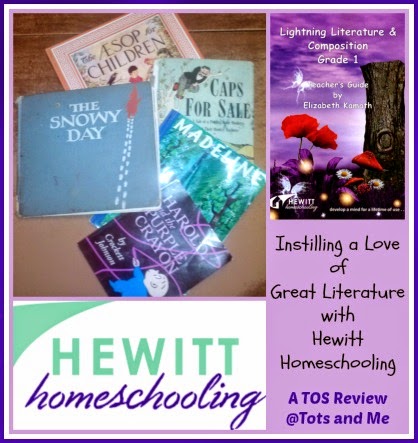
Lightning Literature and Composition from Hewitt Homeschooling {A TOS Review}

Hewitt Homeschooling Review
I love to read. I always have. It still bothers me that my older children don't really enjoy reading and don't have a love of literature. One of the main reasons I wanted to homeschool our younger children is because of the struggles my older children had in reading and reading comprehension while going through the public school system. I desire to instill a love of great literature in my little ones.  That is why I was thrilled when we were given the opportunity through the Schoolhouse Review Crew to use Lightning Literature and Composition from Hewitt Homeschooling


To be honest, I had never heard of Hewitt Homeschooling before, though I understand they are well known in homeschooling circles. I was intrigued when I stopped by their site while researching our choices for the review crew and saw this banner across the page:
Photo Credit: Hewitt Homeschooling

I greatly desire for my children to be strong readers and writers because this will help them succeed in all aspects of their life.. Hewitt Homeschooling has many selections for Junior and Senior High in their Lightning Literature and Composition curriculum. However, they have only just recently begun creating materials for the elementary grades. Currently Grade 1 is available. We have been using the Lightning Literature and Composition: Grade 1 Student Workbook with the Lightning Literature and Composition: Grade 1 Teacher's Guide written by Elizabeth Kamath.

The idea behind Lightning Literature and Composition is to read quality literature and discuss the books along with learning other language arts concepts, including grammar and mechanics, and composition while improving communication skills. In 1st Grade we are using a variety of picture books, each of which will be read at least twice a week as we go through the lessons. These books are not included, but we found them easy to get a hold of (in fact, we own the first 4 books). In addition to the picture books needed for each week, a copy of Aesop's Fables is recommended. 
The lessons are laid out in the Teacher's Guide. This 314 page book contains a section instructing the teacher,  the 36 weekly lessons, plus there is a handwriting guide and pages of lined paper in different sizes that may be photocopied to be used for the compositions. The Student Workbook has 441 pages of lesson pages, plus the dictionary pages in the back. The pages are perforated and have been three-hole-punched to allow the parent to take a lesson out at a time and put it in a binder or folder if desired.
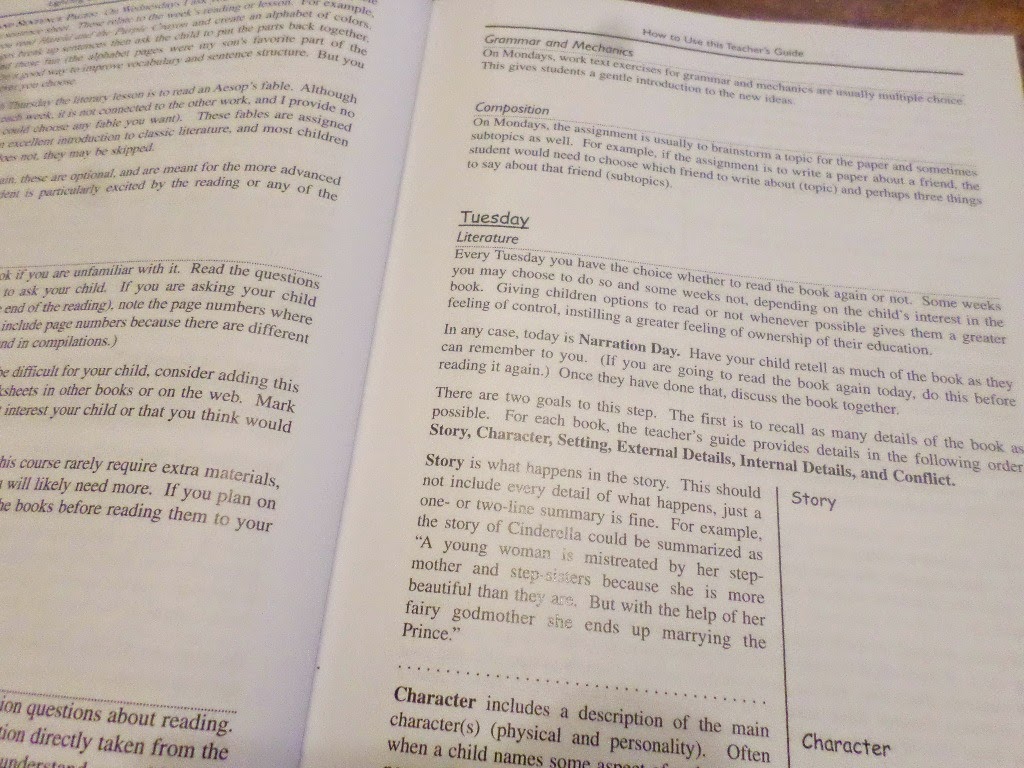
Here is a quick look at the Teacher Guide. Each week follows the same structure, starting with a Week at a Glance page. 

The weekly lessons are then broken down into three parts, Literature, Grammar and Mechanics, and Composition. 
Literature:
The parent or the child reads the book at least twice a week, depending on the child's reading ability. After the book is read (or during the reading) comprehension questions are asked on both Monday and Wednesday. The author stresses that a parent should use these questions as a way to improve the child's comprehension, not as a test at this age. On Tuesdays we have narration day where the child is to retell the story to the parent and then discuss the book looking at certain literary elements (Story, Character, Setting, External Details, Internal Details and Conflict). The final assignment for Literature comes on Thursday. On this day we are to read an assigned Aesop's fable. 
Grammar and Mechanics:
There are lessons on Mondays, Tuesdays, and Thursdays on such subjects as grammar, punctuation, capitalization, parts of speech, and sentence diagramming. The Teacher's Guide tells the parent what the student is to be doing, plus provides the answers. Explanations of what is to be done, along with the occasional example, is then found in the Student Workbook. These lessons link back to the story whenever the author was able to accomplish that goal. For example, the lesson on Tuesday of Week 1 is to underline the words in a paragraph that should start with a capital letter. The paragraph ties into the book as it focuses on a few of the writings of the author, Crockett Johnson.
Composition:
The last aspect of this curriculum can be written by the child or dictated by the child. An assignment is given in the Teacher Guide and each day the child works on a little bit at a time. On Mondays the parent and child are to come up with the topic the child wants to write about. Tuesday is the day to write down a few sentences about the topic being written about. On Wednesday, the rough draft is worked on. Finally, on Thursday, the final draft is written. 
There are also some optional assignments to complete:
Reading Journal Pages are a way for the child to respond to the book. The child is to write a summary of the book, what they think of the book, and their favorite line from the book. These pages can be found in the weekly lesson in the Student Workbook. 

Dictionary Pages are used to help build vocabulary. These pages are located in the back of the Student Workbook and are used by the student. The child is to choose 5-10 words from the story or from daily life, preferably words that are new to the child.

Alphabet and Sentence Pages are also included in the lesson each week. The child is either going to be creating a list of words for a topic related to the week's story for all the letters of the alphabet, or the child will be putting a sentence related to the story back in order. 

Aesop's Fables: As mentioned above, the Aesop's fable is the literary selection for Thursday. The fable assigned is not related to the story, but the author included them because she feels they are "an excellent introduction to classic literature."  That said, they are optional.

Extending the Lesson: This section was included for children who may be wanting more or who may be more advanced and needing more. These suggestions relate to various subjects.
How did we use Lightning Literature & Composition?
I started out by reading through the "How to Use this Teacher's Guide" section. It is quite informative and tells you how to teach each lesson. After describing each section, it gives step-by-step examples on what the lessons will look like each week.

When we start reading the story, I try to include all the children, though the main lessons were completed by Amelia who is going into first grade this fall. Tabitha joined us for the comprehension questions and narration as I was the one writing the answers down in my notebook. 
The first day I read the story, I would gather the children all together on the couch or on the floor in the living room, our preferred reading spots. I always read the story this first time. In order to include the younger children, I have been using ideas out of a book I found at a yard sale called Picture Book Activities by Trish Kuffner. This book is geared for use with preschoolers and has been a great complementary resource for a couple of the stories. Yes, the Lightning Literature curriculum has ideas for extending the lesson, but those ideas are geared for the 1st-2nd grade student who is using the curriculum. I love being able to include all the children when possible, so even though I couldn't find ideas that worked for each book we've read so far, I have been happy to include the younger children when possible.
We have made line pictures to go with Harold and the Purple Crayon.

We made a bouquet of flowers out of cupcake papers to give to daddy.


At some point during the week, I also try to include some food related to the story. We have made Chocolate Pudding Pie as our Kids and a Mom in the Kitchen to go with Harold and the Purple Crayon as there is a scene in the book where Harold has a picnic of nine pies. 


I gave the children a Madeline/France Muffin Tin.


We also made crepes to go with Madeline.

Unfortunately, I was unable to come up with an idea to go with The Snowy Day or Caps for Sale.
In the afternoons we pull out the Lightning Literature books again to get into the meat of the curriculum as it is meant to be used. Amelia and sometimes Tabitha will work on the lessons, though Amelia is the only one using the Student Workbook. 
On Mondays we answer the first set of comprehension questions as I write the answers the girls give me in my notebook. We then brainstorm ideas to go with the composition for the week. I also write these ideas in my notebook. Tabitha is then free to go do other work or play while Amelia completes her Grammar lesson for the day. So far she has been learning about using capitals, periods and exclamation points.  

On the next day, it is time to discuss the book. I write down what Amelia (and sometimes Tabitha) narrates to me from what she remembers of the book. We also discuss the different aspects of the book: story, character, setting, external details, internal details, and conflict. There is another grammar/mechanics lesson to reinforce what was learned the first day. Then we come up with some specifics to write about for the composition. The Reading Journal pages are also to be completed on Tuesday. Sometimes these are pages that get done later in the week if we run out of time. We work on coming up with a 1-2 sentence summary of the book together. I again write this in my notebook. Amelia then copies it into her Student Workbook page. 

Next she is to tell me what she thinks of the story. I write this in her workbook for her as she tells me what to write. Finally, she picks her favorite sentence from the book and copies it into her workbook. 

On the third day, we read the book again and answer more comprehension questions. These questions are not straight, literal questions regarding details of the stories. These dig deeper by having the child infer and evaluate by asking how and why, along with asking for the child's own experience. In the workbook Amelia is to complete the Alphabet or Sentence Puzzle page mentioned above. We also work on the rough draft of the composition. As the girls tell me what to write, I again write it in my notebook. 
On the fourth day Amelia has one more grammar/mechanics page to complete, again reinforcing the lesson learned on Monday. I then have her copy her composition onto lined paper I have printed out. When she is done, she illustrates it.

I store the completed compositions in a folder. When we complete the curriculum I plan on making a book out of them for her to keep. I asked her to pick her favorite to share with you.
 

The assignment was to write something and then draw a picture to illustrate it, just like Harold did in Harold and the Purple Crayon. She chose the topic "cats" and decided to write a story of what her pretend pet cat would do. 
I figured that helping Amelia with some of the preliminary writing and letting her concentrate on writing the final draft helped her concentrate on focusing her thoughts and the neatness of her handwriting without tiring her from too much writing.
I love the way this curriculum is laid out. It is explained well for the parent and easy to teach to the child. The Teacher Guide leads the parent without being too scripted. The workbook pages have the larger font for the child to read easily. The assignments are varied which makes for fun learning experiences every week while learning important aspects of literature. I love digging deeper into the stories and having the grammar/mechanics lessons based off them. 
Amelia likes the sentence puzzles. She likes that there is a maze for the sentence puzzle for Caps for Sale. She does prefer that mommy does the writing for some of the lessons. I am glad that the author has made it clear that the parent can decide how much of the writing the child is responsible for. 
 
The Lightning Literature & Composition Grade 1 Teacher's Guide is $29.95. This can be reused for other children.
The Lightning Literature & Composition Grade 1 Student Workbook is $49.95 and is consumable, meaning the child will use the pages and another workbook will have to be purchased for additional children.
This Grade 1 Curriculum is appropriate for children in first grade and can also be used for beginners in second grade. The Grade 2 curriculum is coming out soon and Grade 3 is in the works. They have plans on working on one grade per year through 6th Grade, which thrilled me, because that means they will always be one year ahead of where we are as I would love to continue using this with my children.
You can find Hewitt Homeschooling on Facebook, Twitter, Pinterest, Google+, and on their blog.
Click to read Crew Reviews
Crew Disclaimer
Related Posts with Thumbnails