Friday, October 9, 2020

Relaxed Learning with Lessons & Unit Studies from NatureGlo's eScience {A Homeschool Review Crew Review}

Disclaimer: I received a FREE copy of this product through the HOMESCHOOL REVIEW CREW in exchange for my honest review. I was not required to write a positive review nor was I compensated in any other way.


We have always been relaxed in our homeschool style, but lately, we've been even more so. I love being able to find different curriculum that allow us to study in a relaxed way. For the last several weeks, Tabitha and Amelia have been using the NatureGlo's eScience MathArt & Science Course Bundle from NatureGlo's eScience. Gloria Brooks, who holds a BA in K-12 Education, is the creator and teacher for these courses. She is a relaxed eclectic homeschool & unschool coach & teacher who has been teaching/facilitating homeschoolers and unschoolers from around the world for the past nine years. Plus she has over 20 years of teaching and child self-directed learning experiences.


As members of the Homeschool Review Crew, we were given a full year's access to 25 different MathArt and Science courses that had been bundled together. When the children log into our account, they can click to see all the courses available to them. Here's a small glimpse of what they have available.


There are science courses in Botany, Bubbleology, Geology, Herpetology, Invertebrates, Mammals, Marine Biology, Marine Reptiles, and Marine Zoology. 

The MathArt lessons include the following lessons: Introduction to MathArt, Math Connections with the Real World, Intro to Patterns & Shapes, MathArt in Ancient Cultures (which we had reviewed a couple of years ago), MathArt in Arts & Science, MathArt in Patterns in Nature, MathArt in The Geometric Beauty of Snowflakes, plus a look at the Life and Mathematical Art of both Leonardo da Vinci and M.C. Escher.

Some of these courses are just one lesson long, while there are others that span 2-6 lessons or even 3 or 6 weeks. And the 1-lesson Unit Studies will take longer than the 1-lesson classes. 

In order to use this site, we have to have internet access. A printer could come in handy for printing out such things as the study guides; however, a student can also use a notebook to take notes and answer questions, or could type in answers in Adobe. 

The girls started out by studying independently, finding topics they were interested in. Amelia chose to go through some 1-lesson courses. She watched the videos for Exploring the Giant Redwood Trees, Intro to Rockhounding, and Introduction to MathArt. Tabitha had been working on Tide Pool Communities when Amelia joined in and they continued together.  I've allowed the girls to work together on their lessons if that is what they choose to do; however, I could make them each their own student accounts, so their individual progress could be kept.

Let's take a closer look at one of the courses the girls worked on: Tide Pool Communities. 


For these lessons there are videos to watch, plus there are downloadable PowerPoint slideshows and study guides to help guide the student in the lesson. In the video, Gloria teaches the lesson with the information found on the PowerPoint slides.


Here's a screenshot of the slide being discussed:


Another fun aspect of this course is the interactive activity. I remember Amelia really enjoyed these when we were going through the MathArt in Ancient Cultures course. From that course we know some of the interactive activities allow you to click through to more information. However, in this lesson, clicking on the pulsing dot or the name of the item would bring up a box with more information about it.

As they went through the course, they wrote notes and then answered the questions from the study guide right in their notebooks.


The girls also used the Quizlet to review the terms. There are several different options available.


These are the different Study Modes:
  • Match - Student is timed matching the word/phrase to the definition
  • Learn - Student answers multiple choice questions to learn the material
  • Test - Student answers various types of questions and receives a grade
  • Flashcards - digital flashcards showing word/phrase on one side and picture plus definition on the other
  • Spell - student sees the picture with the definition, hears the word/phrase, and has to type it out correctly
This one lesson class was quite informative, even mom enjoyed learning new information about tide pools. 

I had seen how fast the girls had completed this lesson, so I was confused as to why another one lesson course was taking them longer. It was then that I realized there is a difference between the one lesson class and the one lesson unit study. 

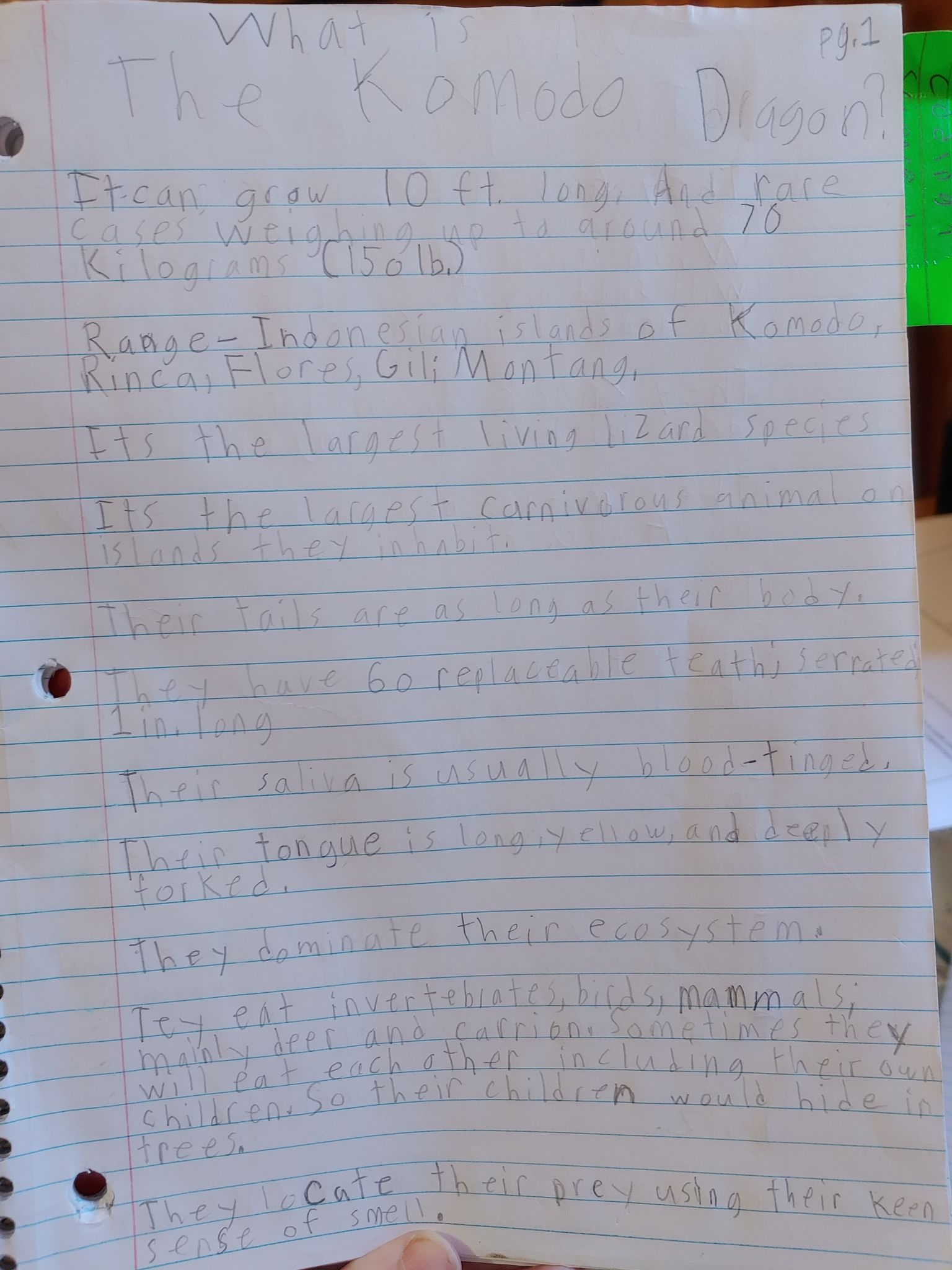
The girls were also interested in learning about Komodo Dragons. This course is a one lesson unit study. 


This unit study contains seven different parts which include various subjects. Students will learn about Komodo Dragons and also study history, geography, art, literature, and creative writing.


The girls are currently working through the main lesson slideshow and taking notes. 


There are then some really interesting facts about komodo dragons they can read about, there are even some videos for them to watch.


The interactive activity from this course was the map activity.


Plus there is a video to watch to draw a komodo dragon. 
There are so many intriguing courses that the children can choose to take. I love the combination of Gloria teaching in the videos with the slides and the interactive aspects that make even online learning hands-on. And I have always loved unit studies, being able to incorporate multiple subjects in our lessons. The girls are also enjoying being able to delve deeper into topics that are of interest to them. 

I do think they are enjoying these science topics more than the did the MathArt course we reviewed a couple of years ago. Of course, they are also older now. When we reviewed it last time, the girls were at the low end of the recommended age range. Now they are 12 and 13 years old, and I think better able to take notes and pay focus on what is being taught. 

Whether you choose to supplement your current curriculum, or use the courses as a full curriculum, I highly recommend NatureGlo's eScience for your children to learn not only science, math, and art, but to be able to incorporate multiple subjects. 

You can find NatureGlo's eScience on Facebook, Twitter, Instagram, Pinterest, and YouTube.

Don't forget to click on the banner below to see what my fellow Crew Mates had to say about NatureGlo's eScience.


Friday, October 2, 2020

Learning to Code with Simply Coding {A Homeschool Review Crew Review}

 Disclaimer: I received a FREE copy of this product through the HOMESCHOOL REVIEW CREW in exchange for my honest review. I was not required to write a positive review nor was I compensated in any other way.


Tabitha has been interested in coding for at least a year now. She had taken out a book on the topic from the library a while ago, but of course, that had to be returned. I have tried to encourage this interest, as I realize how important knowledge of computers is these days. So, when the opportunity arose through the Homeschool Review Crew to review the Coding for Kids Annual Membership from Simply Coding, I was quite excited. And when we learned we could have three family member accounts, hubby and I were both thrilled, because that meant Amelia could also get to try it, and so could the hubby. 


Simply Coding offers both single student memberships and family memberships for homeschoolers. Additionally they have curriculum for schools. You can even try out the course with a 10 day free trial period. This membership gives your student(s) unlimited access to the entire pathway of courses. In addition to the Simply Coding pathway, there are three additional pathways: Simply Media, Simply Tech Essential, and Simply Tech4Kids.


In the Simply Coding pathway, there is a "Just for Fun" course (Minecraft Mods in Java), along with Beginner, Intermediate, and Advanced courses. As you can see in the screenshot above, three of the courses are light gray, while the others are dark gray. The light gray courses are the beginner courses which are initially unlocked. In order to unlock the more advanced courses, the beginner courses need to be completed. 

The Simply Media pathway includes such courses as Digital Photography, Digital Videography, Adobe Lightroom, Adobe Photoshop, and Camtasia Studio 8, among others, and more advanced courses. 

The Simply Tech Essentials pathway includes Microsoft Excel - Fundamentals, Build Your Own Computer, Prezi, Microsoft Powerpoint, and more.

And the Simply Tech4Kids pathway includes Intro to Electronics, Intro to Programming: Scratch Parts 1 and 2, Blogging 4Kids (which Amelia is interested in),  Photography 4Kids, Internet Safety 4Kids, and more.

I actually hadn't realized how many different courses Simply Coding had available. However, as we had wanted to review the coding, we started with the Simply Coding pathway. I wasn't sure if my girls would prefer JavaScript Game Design or Intro to Web Development, though I was leaning toward the Game Design. Imagine my surprise when they both decided to start with Intro to Web Development.

Let's look at how the Intro to Web Development course is set up. 


There are eight lessons, and they contain from two to six sections. You can navigate to previous lessons by clicking on the blue lessons tab on the left side of the screen, which will pull out the menu. Clicking on each lesson's folder will show the different sections of the lessons. Each lesson also has a quiz which must be successfully passed before moving on to the next lesson. 

The course starts with a welcome and introduction, explaining how the course will work. The instructor makes sure to mention that the gray arrows on the slides will move the student through the slides in that section of the lesson, where the "Prev" and "Next" buttons at the bottom of the screen will take the student on to the next lesson. And the student will need to download certain files, their workspace folder. My husband helped the children with the downloading

For the interactive lessons themselves, the student can read through the information in the slides, clicking and typing when prompted to. They can also click the green "Click Here For Video Review" to have the instructor give a run down of the lesson. 


My girls didn't realize at first that watching the video would help them understand the lesson, so they were struggling. Once they realized they were supposed to watch the videos, the lessons made a lot more sense to them. As I am a hands-on learner, I really do appreciate that even though they are on a computer, the lessons are just things they are reading and watching, they get to interact with this program and they are learning to write their own code following the instructions, understanding it as they go, and actually have websites they are developing. 

Here's a look at the how the video appears on the screen. It can be enlarged to full screen, but I also like that the student can keep it small so they can see their slides.


And as they work, their text editor, Sublime, can be right on the screen with their lesson.


Here is the first project the girls were working on. They learned how different HTML tags manipulated the text.

Here is Amelia's:


And here is Tabitha's


And then they started working on their own websites. They are both obsessed with animes, so they are focusing their websites on some of their favorites. 

Here's a look at what Amelia has so far:


She has really enjoyed making her website and even though she struggled at first, she is understanding it better now. She appreciates being able to follow the  instructors instructions and pause the video to pull up her text editor and copy what he did. 

Tabitha has been working through the course a bit slower as she wants to make sure she comprehends what she is being taught. She is also enjoying it so far, and also mentioned appreciating that she could pause the video to keep up. 

Personally, I am quite impressed with what they are learning and very thankful for the chance for the girls to learn such an important skill for this day and age. I took some time to work through some of the beginning lessons, and I really appreciate the videos because I also would be confused if I had only the slides to go by. 

If you are looking for a coding course for your child(ren), I highly recommend Simply Coding. You may even find another course they are interested in.

You can find Simply Coding on Facebook and YouTube.

Don't forget to click on the banner below to see what my fellow Crew Mates thought of Simply Coding.


Wednesday, September 9, 2020

Wordless Wednesday: September 9, 2020 (w/linky) - Callie Getting Into Things

Yep, more pictures of Callie getting into more things. Silly kitty!


Looking forward to seeing your Wordless (or not so wordless) Wednesday posts this week.

No button currently, and there won't be one until I can figure it out seeing as Photobucket has changed things. Feel free to still share the picture in place of the button on your Wordless Wednesday post or in a list of Wordless Wednesday linkies. Just link it to my Wordless Wednesday permalink please.


You are invited to the Inlinkz link party!
Click here to enter

Wednesday, September 2, 2020

Wordless Wednesday: September 2, 2020 (w/linky) - Where's Callie Today?

Callie in my bag:


Callie in a box:


Callie sleeping in the box:


Callie hiding in a box:


Peek-a-boo:


Callie on the couch:


Callie still on the couch:


And still on the couch:


Callie in the library book box:


Callie between the totes:


Callie on the windowsill:


Anyone else see the heart there?

Looking forward to seeing your Wordless (or not so wordless) Wednesday posts this week.

No button currently, and there won't be one until I can figure it out seeing as Photobucket has changed things. Feel free to still share the picture in place of the button on your Wordless Wednesday post or in a list of Wordless Wednesday linkies. Just link it to my Wordless Wednesday permalink please.


You are invited to the Inlinkz link party!
Click here to enter
Related Posts with Thumbnails