Thursday, May 28, 2020

Learning About Computer Science and Coding with Workman Publishing {A Homeschool Review Crew Review}

Disclaimer: I received a FREE copy of this product through the HOMESCHOOL REVIEW CREW in exchange for my honest review. I was not required to write a positive review nor was I compensated in any other way.


Tabitha had become interested in coding a while back when she had found a book at the library. She has since returned that book, but was quite interested when the opportunity arose for her to review Everything You Need to Ace Computer Science and Coding in One Big Fat Notebook written by Grant Smith and published by Workman Publishing. I figured this was an important interest to encourage, seeing as computers are so important in everyday life. 


This 566-page, 8"x 6" softcover "Big Fat Notebook" is the newest of a series. There are also "Big Fat Notebook" study guides for Math, Science, American History, World History, and English Language Arts.  I love that these are put out by the makers of Brain Quest. Tabitha used to love her Brain Quest workbook when she was a preschooler, and so did I. So, I was quite intrigued to learn they had these books for middle schoolers (recommended ages 11-14). I am definitely contemplating adding the other books to our homeschool library.


This Computer Science and Coding study guide is recommended for those who may be having trouble with their computer science class, or with a coding project. Perhaps you already had a class and would like to refresh your memory, this would work as well. Tabitha has been using it to teach herself the basics, and I figured it would be a great way for me to learn, because well, computers and technology never really have been "my thing," and I would like to change that.

There are eight units in this "Big Fat Notebook," which are then broken down further into chapters (between 2-9 chapters for each unit, for a total of 39). Here are the subjects you and your students will learn about in this book. 
  • Unit 1: Computing Systems
  • Unit 2: Data and Analysis
  • Unit 3: Software Engineering
  • Unit 4: Algorithms and Programming
  • Unit 5: Universal Programming Principles
  • Unit 6: Programming with Scratch
  • Unit 7: Programming in Python
  • Unit 8:Web Development
I appreciate that the book starts with the basics, allowing the student to learn what computer science is and what computers really are, along with their background. I mean, yes, children these days use computers or tablets, or phones, all the time from a very young age, but I think there is definitely a benefit to understanding the basics. I love that it looks at what is and is not computer science. Sorry, no, playing a video game is NOT computer science. Programming your own IS. 

I really love the fact that the book looks like a notebook, complete with highlighting and doodles. As the student works through the book it helps to know the way it has been organized. 

Vocabulary words are highlighted in yellow and definitions are in boxes:


Important people, places, dates, and terms are written in blue:


There are doodles, graphics, and charts to show big ideas.


I really do love that humor is added with these graphics.


And the charts really help the visual learners.


And main ideas are underlined. 


Each chapter concludes with a "Check Your Knowledge" section.


The answers are then shared on the following pages.
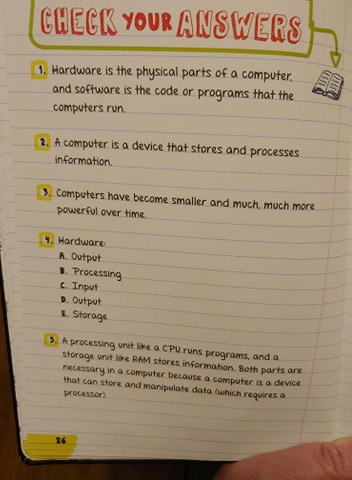

Tabitha has been working though this book, doing about a chapter a week. She reads and then rereads if she needs to make sure she is comprehending. She takes notes in a notebook, and answer the questions there as well. Even though there is some room to answer questions in the book, I have found there isn't really enough to write out the answers all the time. So, we are using the book more as a study guide and textbook, keeping it fresh for younger siblings.


Though you do not have to work though the book in order, in fact it is color coded to be able to easily go to the unit you are interested in learning about, Tabitha prefers to work in order, as do I. Personally, I can't wait until she gets to the chapters on programming with Scratch and Python. It looks very interesting.

From what I have been able to tell, not being very knowledgeable myself in computer science, this book is a wonderful foundation for the age range it is meant for, along with beginners of any age (i.e. me as an adult with no clue). The information is laid out in an inviting fashion and makes learning fun. I definitely recommend this as an addition to your homeschool library. And I definitely want to look into the other books in this series.

You can find Workman Publishing on Facebook, Twitter, Instagram, Pinterest, and YouTube.

Don't forget to click on the banner below to see what my fellow Crew Mates had to say about Everything You Need to Ace Computer Science and Coding in One Big Fat Notebook.

Everything You Need to Ace Computer Science and Coding in One Big Fat Notebook {Workman Publishing Reviews}

Tuesday, May 19, 2020

Littles Learning Link Up: May 19th, 2020


Each month you will find:
  • Posts where I share what I have been up to with my elementary-age children and the preschoolers I work with at our homeschool co-op (including occasional highlight posts where I share how we used ideas that have been linked up here on Littles Learning Link Up).
  • The occasional round up post.
Each week, I will host a link up, where you can share either what you have been up to recently, or old posts that may go with the theme.  Feel free to link up more than one post.

Each week I will continue to feature a couple of posts from those that have been linked up. 

I hope you will continue to share your wonderful posts, and I hope you will find something new to try with your child(ren).

It would be great for everyone to stop by and visit the other linked-up posts as well. Check them out, leave some comments, pin those that interest you. Let's make this a real party and socialize with each other.

Here's a peek at what we have been up to in our homeschool.

Hmm, an update on our homeschool. Last week was a no-school week (as we school 5-6 weeks on, 1 week off). However, the children were still using Beyond the Stick Figure for art because that review was due last week. In fact, here's a look at some of the art created last week.


You can read my review here.

Plus they have been using EdShed for math and spelling practice. Harold has also been using Reading Kingdom daily. Tabitha has been learning about computer science and coding with a book from Workman Publishing. She has been working through the book independently and seems to be enjoying her time in the book. Next week I will be sharing my reviews of Reading Kingdom and Workman Publishing. And then in June there will be reviews EdShed (MathShed and SpellingShed) plus Page a Day Math. 

We are also going to start in with some history again, though we are doing some review using The Mayflower at Cape Cod (another new review product) plus Time Travelers: The American Revolution (not a review product, just a product I want to try from Homeschool in the Woods). 

I plan to get back to our My Father's World studies during the next school year. 

Unfortunately I have no more co-op lessons to post about. Hopefully co-op will start back up in the fall.

Littles Learning Link Up Features

On my last Littles Learning Link Up post, there were 3 wonderful posts linked up. I'll feature a randomly selected post and the most clicked on post.

Please, don't forget to stop by other posts that are linked up. See what catches your eye, stop by, pin the post to a relevant board, and perhaps leave a comment to let the author of the blog know you have been by for a visit. I know I appreciate others commenting and letting me know they have read my posts, so I am sure others do too.

This week's randomly selected post is:


Gale from Imaginative Homeschool shared Learning Games for Elementary.

This week's most clicked on post is:


Join the Party!

I would love to have you join in this week! What sort of activities do you do with your young children? Do you have some favorite activities you would like to share? I invite you to link up below. I will be pinning posts on one of my relevant boards, and I would love to feature some of the activities each week from what is linked up.

Please know I may share a picture from your post and link back to it, along with sharing how we used your idea in our school time. By linking up you are giving me permission to use a picture from your post. I will ALWAYS give credit and link back. Additionally, if you choose to try out any of the ideas with your child, please make sure you give credit where credit is due.

Linky will be open through Monday night, to give me time to check out all the posts and get the Features organized. Please take the time to visit some of the other wonderful posts linked up.

No button currently, and there won't be one until I can figure it out seeing as Photobucket has changed things. Feel free to still share the picture in place of the button. Just link it to my Littles Learning Link Up permalink please.


I am sharing over at

Homeschool Coffee Break

You are invited to the Inlinkz link party!
Click here to enter

Friday, May 15, 2020

Math Practice with Math Essentials {A Homeschool Review Crew Review}

Disclaimer: I received a FREE copy of this product through the HOMESCHOOL REVIEW CREW in exchange for my honest review. I was not required to write a positive review nor was I compensated in any other way.


Tabitha has taken a break from her normal math curriculum to use Mastering Essential Math Skills Book 2 Middle Grades/High School from Math Essentials. This is the same company that publishes Math Refresher for Adults, which I reviewed a couple of years ago, and some of my fellow Crew Mates have been currently reviewing. I had enjoyed the book I was using, and figured Tabitha could see what she thought about the book that was designed for her age group.


We received the 158-page, softcover book, plus we also have access to free online video lessons. The book is divided into eight topic sections, plus there is a final review section in the back, followed by the answer key. The book concludes with a Resource Center that contains a glossary, important symbols, and charts. 
   

Here is a list of the chapter topics the book is divided into:
  • Whole Numbers
  • Fractions
  • Decimals
  • Percent
  • Geometry
  • Integers
  • Charts and Graphs
  • Word Problems
There is a section at the beginning of the book that explains the 8-step process in using the book. I took this to be more for classroom use, and have actually been allowing Tabitha to use the book independently. 

Each page has the same format. The top of the page has Speed Drills and Review Exercises. 


The idea of the speed drills is that I choose a number to put in the center of the circles and Tabitha gets to work on her math facts for both addition and multiplication.


I'll time her to see how fast she can get it done.


Next she will work on the review exercises if she feels she needs the practice. 

The middle of the page gives helpful hints for that page's lesson. Most of the time it will also show a couple of examples. There are then 12 problems to work out, 2 of which are labeled "S" for sample, or so we assume. And then at the bottom of the page there is a Problem Solving word problem.


Each lesson has a corresponding video lesson on the Math Essentials website.


The lessons are taught by the author of the book, Richard W. Fisher, winner of the "Intel Innovations in Teaching Award."  He will teach the lesson off-screen while the lesson appears on the "board."


Tabitha decided she wanted to start at the beginning of the book because she likes to work through things in order. I agreed with this decision because I wanted to make sure she was confident with all these essential skills that build upon each other. So she has been working through the Whole Numbers and Fractions sections of the book, most days working on one page, other times doing two or even on occasion three. The hints help her to make sure she is on track. 

She's worked through Addition, Subtraction, Multiplication, and Division of whole numbers, plus such topics as Identifying Fractions, Expressing them in their simplest form, adding and subtracting them. 


  Tabitha has enjoyed working through this book and I am glad she is able to ensure she knows all these essential math skills. What sort of surprised me though, was when I learned that the lessons are the exact same lessons, down to each and every problem, as the corresponding lessons in the Math Refreshers for Adults book. I honestly thought the lessons were going to be at a different level as the one was supposed to be for adults. So, technically, she has been reviewing the same material I reviewed two years ago. Granted, the Mastering Essential Math Skill Book 2 book is half the size as it doesn't include the pre-algebra and algebra that is in the second half of the Adult Refresher book. And she does have Speed Drills where the adult book does not. 

I'm not saying that makes it a bad book in any way. I'm just confused as to how one book is marketed for adults and the other for middle grades/high school. Plus, I would think a high school book should still have the pre-algebra and algebra section. I'm finding it difficult to determine what grades the book would be appropriate for. 

You can find Math Essentials on Facebook.

Don't forget to click on the banner below to see what my fellow Crew Mates have to say about the Math Essentials book they reviewed. We had our choice of this Mastering Essential Math Skills Book 2 Middle Grades/High School, Math Refresher for Adults, and No-Nonsense Algebra.


No-Nonsense Algebra, Math Refresher for Adults &  Mastering Essential Math Skills Book 2 Middle Grades/High School {Math Essentials Reviews}

Wednesday, May 13, 2020

Enjoying Art Lessons with Beyond the Stick Figure {A Homeschool Review Crew Review}

Disclaimer: I received a FREE copy of this product through the HOMESCHOOL REVIEW CREW in exchange for my honest review. I was not required to write a positive review nor was I compensated in any other way.


My children and I have been enjoying art lessons from Beyond the Stick Figure Art School. The instructor, Sally, has a degree in art from Loughborough College of Art and Design in England. Since then she has moved to America and now homeschools her eight children. She wanted to be able to pass on her art skills, and one way she has done that is by sharing them in this art program. We are reviewing the Beyond the Stick Figure Complete Drawing Course PLUS 3 Bonus Courses. 


We have actually been given a lifetime membership to this program. Most of the courses have three parts, though the Pen & Ink course has only two. Each part is then divided into numerous topics or steps or days (take your pick, she actually calls them all three on the site). The Drawing course has a total of 55 topics, Pen & Ink has a total of 15, Watercolor has a total of 52, Acrylic has a total of 24, and 3D Design has a total of 30. 

When you log into your account you will see a bar that shows your progress, and then below that you will see the course you are signed up in, plus a link to click to look at the materials needed. There is quite the list of materials needed for all of these courses combined. Thankfully we were able to start with just a sketchbook and PrismaColor markers in the Drawing Course. She was quite particular on which materials to purchase, which I can understand the thought process behind needing quality art supplies. 


The lessons build upon one another, so you are not able to move to the next one until the current one has been marked complete. Personally, I would have loved to have been able to have moved between the different courses without having to complete the previous one. Thankfully we were able to mark them complete without actually watching the video, so I could move ahead to check out all the courses. Though, I did feel like I was cheating a bit, and it was a bit time consuming waiting for each to load before being able to mark it complete. 

The majority of the review period was spent in Drawing Part 1 and a little of Drawing Part 2. Then we sort of skipped to Pen & Ink because the children wanted to try something different. 

I appreciated that Sally decided to start by teaching the students to see like an artist, and to look for circles, dots, curved lines, and straight lines in the world around them. This seemed to match well with the sample video that is available on the site, where you get to use those different shapes to create a picture. (I won't tell you what it is, as I don't want to spoil it for you, but you can watch that video and try it out right on the main page without having to join.) 

Sally described circles, dots, curved lines, and straight lines to us.


For the first week using the program, Harold and Hannah explored the house and yard, going on a little scavenger hunt each day, looking for those parts that make up everything we see. There were worksheet pages we had to download where they could define and practice each, and then draw their own masterpiece using that specific shape. For example, here is Hannah's Circle Creation.


The next week was spent taking our knowledge of circles, dots, curved lines, and straight lines a bit further. Plus, we were able to work with the markers we had purchased for the course. So far this has been my favorite part of the course because I got to doodle. 

The instructor showed us what it was she wanted us to do.


And then we got to drawing and coloring. 

Here are my circle, dot, and curved line doodles:


These are Hannah's circles, dots, curved lines, and straight lines.


We then had 4 projects to complete that combined the different shapes.

Project #1: We were to draw 3 circles, 5 dots, and color any way we wanted to
Project #2: We were to draw curved lines all over the page, letting them overlap. We weren't to take our marker off the paper. Then we were to color it.
Project #3: We were to cover the page with circles, turning some into dots, and then draw curved lines. Again we were to color them how we desired.
Project #4: We were to start at one end of the paper, draw a small line, let the marker sit to form a dot, then go in a different direction, and repeat til we hit the end of the paper. Then we were to do it again and again, overlapping the lines.

Here's a look at mine:


 And here are Hannah's:

Harold used smaller paper so he was able to fit a bunch of his on one page.


I definitely appreciated that Sally gave us the option to use the size paper we were comfortable with. Harold didn't want to make his pictures very big, so he just used the 1/8 of a page size. I prefered using paper the size of 1/4 of a regular size sheet of printing paper. And Hannah used both sizes.

Drawing Part 1 finishes off with some lessons on primary/secondary colors and overlapping. 


In Drawing Part 2, Sally had us practicing little details over and over again in a grid. First we were to trace, then we were to follow dots, and then we were to draw them without any guidance. As we couldn't find any blank grids, I just had the children practice tracing and following the dots. 


Sadly, the children were not fond of these lessons, and neither was I honestly. As I had looked ahead to become knowledgeable of the different courses for this review, I realized the entire month of lessons was going to be repeating different lines and curves over and over. After several days of the children struggling with trying to follow the dots, I decided to move on to the Pen & Ink section. 

I am thankful that I did, because they had a lot more fun and I even got Tabitha to try it out. She is quite the artist, and wasn't interested in trying out the beginning lessons, but when she saw that watercolors were involved, her interest was piqued. 

I did notice that the Pen & Ink course seemed to go hand-in-hand with the Watercolor course, seeing as watercolors are used for the two Pen & Ink lessons. 

The first was a tiny 3"x2 1/4" project. The art itself was contained to a 1 inch square, while the rest was a frame. 


The other lesson in Pen & Ink teaches us to make a transfer by first drawing it on tracing paper, flipping it to the reverse side and tracing it again in pencil, and then transferring it to the watercolor paper and tracing it again with the Sharpie marker. 


I know Hannah is really looking forward to continuing on with the Watercolor course. Harold is greatly anticipating moving on to the the 3D Design, especially because our clay and other supplies arrived the other day. 

Though we weren't a fan of Drawing Part 2, we have really been enjoying the rest of this art course. I do wish she could make it so you could go to the other courses without first having to work through the others. I would also love to see more drawing lessons that were more like the sample on her site. We had spent a lot of time focusing on circles, dots, curved lines, and straight lines, and I would have loved to have incorporated that more. 

You can find Beyond the Stick Figure on Facebook, Instagram, Pinterest, and YouTube.

Don't forget to see what my fellow Crew Mates tught about Beyond the Stick Figure Art School by clicking on the banner below.


Beyond the Stick Figure Complete Drawing Course {Beyond the Stick Figure Art School}
Related Posts with Thumbnails